> ## Documentation Index
> Fetch the complete documentation index at: https://docs.hiveinspect.com/llms.txt
> Use this file to discover all available pages before exploring further.
# AI Comment Merge: Combine Related Defect Comments
> Combine up to three related defect comments into one with Hive AI Comment Merge. Photos, location tags and descriptions carry over, and Hive writes a new title.
## What Comment Merge does
Comment Merge combines related defect comments in a report into a single comment. Select up to three comments and Hive writes one new comment with a new title. The photos, location tags and descriptions from every comment you selected move into it, so the report reads shorter and less alarming without losing anything.
It works in the defect summary, on the web and in the mobile app. Comment Merge is part of Hive AI, listed under **Business Tools → Hive AI** in the web dashboard, and it's included on every plan.
 ## How to merge comments
* **On the web:** open the report and use the three dot menu to open the defect summary, which lists every defect on the report together.
* **On mobile:** open the inspection, tap **Report Editor** and pick the report to reach the same view.
* Tap **Merge comments**, select the comments that belong together (up to three) and confirm.
* Hive gathers the photos, location tags and descriptions into one comment and writes a new title for it.
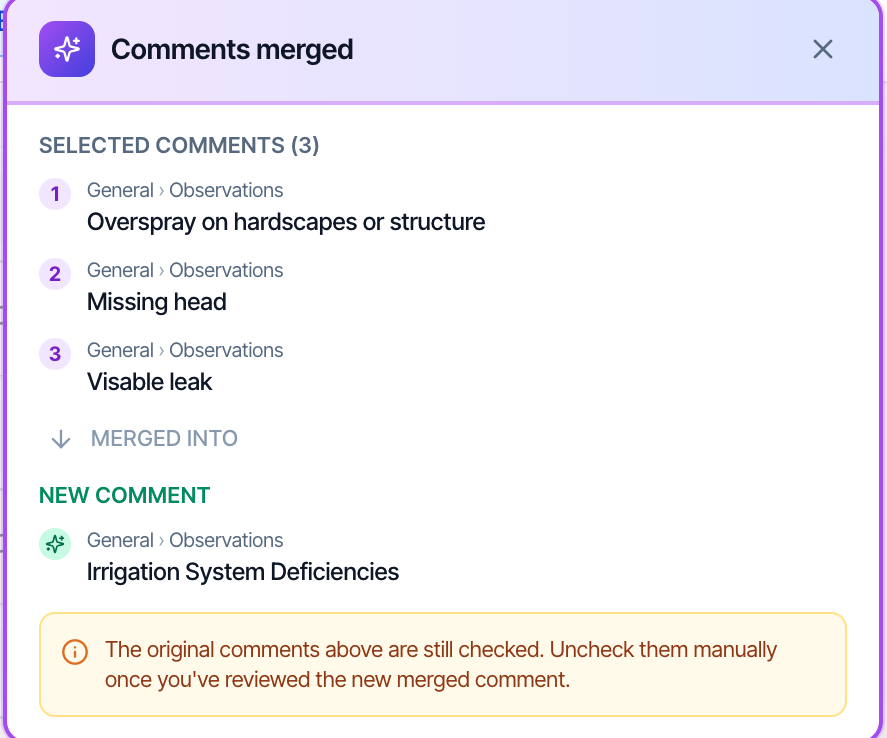
* A prompt names the comments that went in and the comment they became. On mobile, the new comment opens expanded.
* The comments you merged stay checked on purpose. Read the new comment first, then uncheck the originals.
* Save and refresh. The merged comment is in the report in place of the ones you combined.
## Worth knowing
* **Up to three comments** per merge.
* **Nothing is deleted for you.** Because this is AI, Hive doesn't uncheck anything by default.
* **Needs an internet connection**, like the other Hive AI tools. The rest of the app works offline and syncs when you're back online.
## FAQ
No. The originals stay checked until you uncheck them yourself.
Yes. The merged comment takes the photos, location tags and descriptions from every comment in the merge, and Hive writes a new title covering all of them.
No. Comment Merge is included on every plan, with no usage cap.
See the [Comment Merge feature page](https://www.hiveinspect.com/features/ai-comment-merge) for a video walkthrough.
This documentation is built and hosted on [Mintlify](https://mintlify.com), a developer documentation platform.
## How to merge comments
* **On the web:** open the report and use the three dot menu to open the defect summary, which lists every defect on the report together.
* **On mobile:** open the inspection, tap **Report Editor** and pick the report to reach the same view.
* Tap **Merge comments**, select the comments that belong together (up to three) and confirm.
* Hive gathers the photos, location tags and descriptions into one comment and writes a new title for it.
* A prompt names the comments that went in and the comment they became. On mobile, the new comment opens expanded.
* The comments you merged stay checked on purpose. Read the new comment first, then uncheck the originals.
* Save and refresh. The merged comment is in the report in place of the ones you combined.
## Worth knowing
* **Up to three comments** per merge.
* **Nothing is deleted for you.** Because this is AI, Hive doesn't uncheck anything by default.
* **Needs an internet connection**, like the other Hive AI tools. The rest of the app works offline and syncs when you're back online.
## FAQ
No. The originals stay checked until you uncheck them yourself.
Yes. The merged comment takes the photos, location tags and descriptions from every comment in the merge, and Hive writes a new title covering all of them.
No. Comment Merge is included on every plan, with no usage cap.
See the [Comment Merge feature page](https://www.hiveinspect.com/features/ai-comment-merge) for a video walkthrough.
This documentation is built and hosted on [Mintlify](https://mintlify.com), a developer documentation platform.