In the dashboard: Business Tools → Services & Fees
## The short answer * A **main service** is an inspection you sell on its own, such as **Home Inspection**, **Pre-Listing Inspection** or **Re-Inspection**. It is picked first, and it decides the price, the time, the report templates, the agreements and the automations of the inspection. * **Each inspection has one main service.** * An **add-on service** is an extra sold with a main service, such as **Radon Testing** or **Sewer Scope**. To sell more than one service on the same inspection, add the others as **add-ons of the main service**. For example, a client who wants a home inspection, a radon test and a sewer scope gets one inspection: **Home Inspection** as the main service, with **Radon Testing** and **Sewer Scope** as its add-ons. ## How it looks on an inspection When you schedule in the dashboard, **Select Service** lists your main services. You pick one.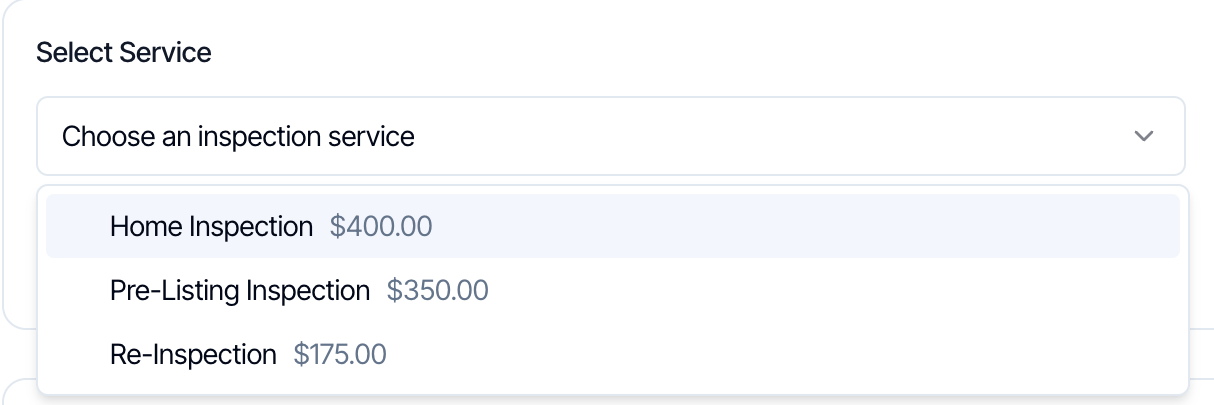 Once a main service is picked, it takes the place of the list. The **Add-ons** section then offers that service's add-ons, and you can add as many as you need.
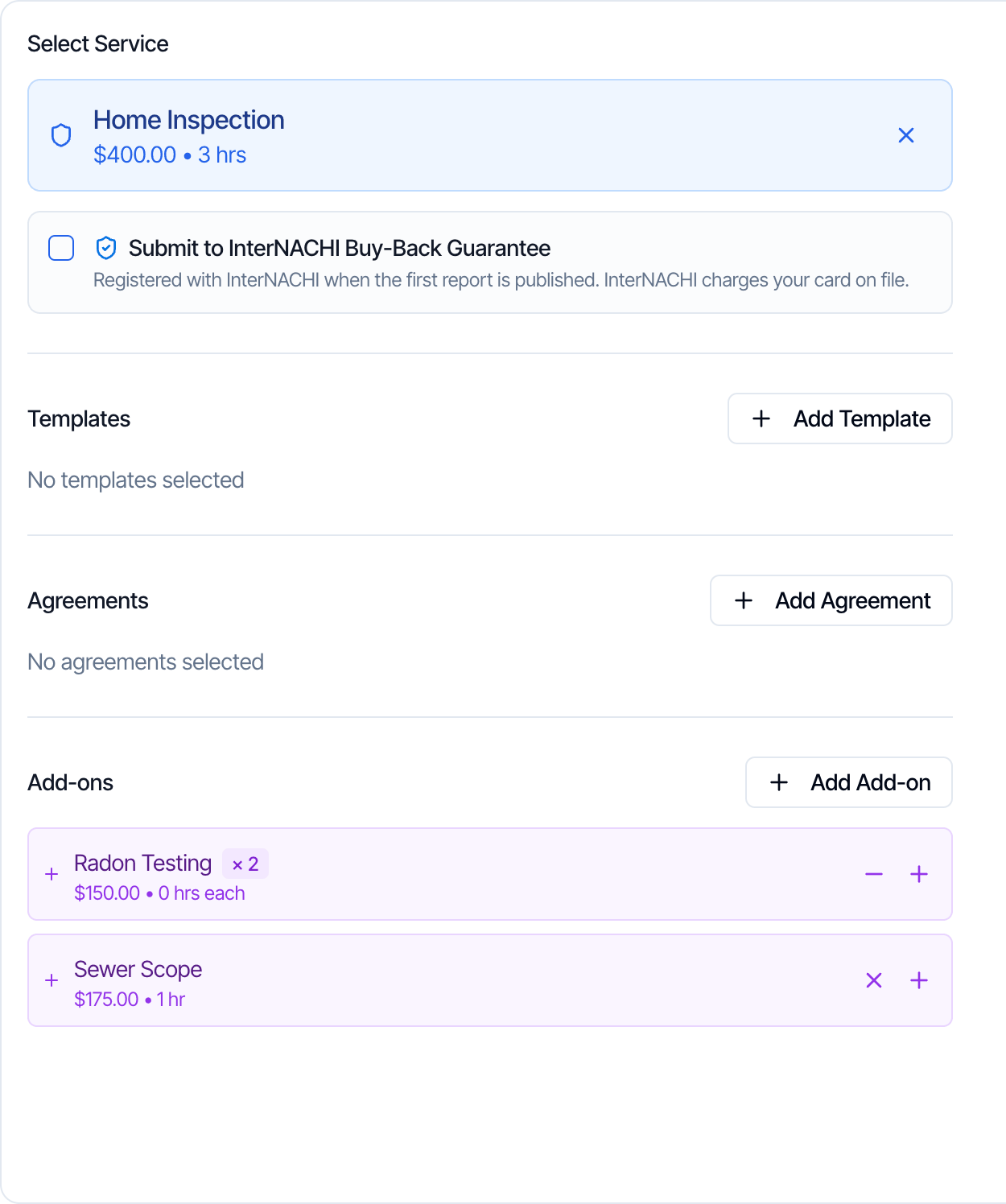 Your online scheduler and quote widget work the same way: the client picks one service, then the add-ons of that service. See [Online booking](/how-tos/booking-online-inspection).
## Why one main service
The main service ties the inspection together:
* its **templates** become the reports of the inspection
* its **agreements** are sent to the client to sign
* your **automations** can be set to run only for certain main services
* its **taxes** are charged on the whole order
Add-ons build on that. They can bring their own templates, agreements and price, but they always belong to a main service.
## Main service and add-on compared
| | Main service | Add-on service |
| - | - | - |
| On an inspection | One per inspection | Any number, each belongs to the main service |
| Can be booked on its own | Yes | No, only with its main service |
| Price | **Base Price** | **Add Fees (\$)** |
| Time | **Base Duration (hours)** | **Add Hours** |
| Templates and agreements | Yes | Yes, added to the inspection with the add-on |
| Price modifiers | Yes | Yes, its own add-on modifiers |
| Taxes | Yes. They are charged on the whole order | None of its own. The main service's taxes cover it |
| Has add-ons | Yes | No |
| Hide it from the online scheduler | **Hidden on scheduler** | **Hide from Scheduler** |
| Clients can add it after booking | No | Yes, with **Allow Upselling** on |
| More than once on an inspection | No | Yes, in the dashboard |
| Shared between services | n/a | No. Each main service has its own copy |
## Sell a service both on its own and as an add-on
Some services, such as radon testing, are booked on their own by some clients and with a home inspection by others. Set them up both ways:
1. Create **Radon Testing** as a **main service**, for clients who only want radon.
2. Add **Radon Testing** as an **add-on** on each main service it goes with, such as **Home Inspection** and **Pre-Listing Inspection**.
To copy the add-on to several main services quickly, build it once, then use **Add from Another Service** on each of the others. See [Use the same add-on on several services](/how-tos/add-on-services#use-the-same-add-on-on-several-services).
## Change the main service of an inspection
On an inspection, click the **X** on the main service to remove or change it.
Hive asks you to confirm first.
* **On a new inspection,** this removes the service with its templates, agreements and add-ons. Pick another service to continue.
* **On a saved inspection,** changing the service permanently deletes all reports, agreements, automations and custom pricing lines currently on the inspection. You can't save the inspection until you pick the new service. The new service's reports, agreements and automations are then created from scratch.
Agreements already signed and reports already published stay available where they were saved, but are removed from this inspection.
Your online scheduler and quote widget work the same way: the client picks one service, then the add-ons of that service. See [Online booking](/how-tos/booking-online-inspection).
## Why one main service
The main service ties the inspection together:
* its **templates** become the reports of the inspection
* its **agreements** are sent to the client to sign
* your **automations** can be set to run only for certain main services
* its **taxes** are charged on the whole order
Add-ons build on that. They can bring their own templates, agreements and price, but they always belong to a main service.
## Main service and add-on compared
| | Main service | Add-on service |
| - | - | - |
| On an inspection | One per inspection | Any number, each belongs to the main service |
| Can be booked on its own | Yes | No, only with its main service |
| Price | **Base Price** | **Add Fees (\$)** |
| Time | **Base Duration (hours)** | **Add Hours** |
| Templates and agreements | Yes | Yes, added to the inspection with the add-on |
| Price modifiers | Yes | Yes, its own add-on modifiers |
| Taxes | Yes. They are charged on the whole order | None of its own. The main service's taxes cover it |
| Has add-ons | Yes | No |
| Hide it from the online scheduler | **Hidden on scheduler** | **Hide from Scheduler** |
| Clients can add it after booking | No | Yes, with **Allow Upselling** on |
| More than once on an inspection | No | Yes, in the dashboard |
| Shared between services | n/a | No. Each main service has its own copy |
## Sell a service both on its own and as an add-on
Some services, such as radon testing, are booked on their own by some clients and with a home inspection by others. Set them up both ways:
1. Create **Radon Testing** as a **main service**, for clients who only want radon.
2. Add **Radon Testing** as an **add-on** on each main service it goes with, such as **Home Inspection** and **Pre-Listing Inspection**.
To copy the add-on to several main services quickly, build it once, then use **Add from Another Service** on each of the others. See [Use the same add-on on several services](/how-tos/add-on-services#use-the-same-add-on-on-several-services).
## Change the main service of an inspection
On an inspection, click the **X** on the main service to remove or change it.
Hive asks you to confirm first.
* **On a new inspection,** this removes the service with its templates, agreements and add-ons. Pick another service to continue.
* **On a saved inspection,** changing the service permanently deletes all reports, agreements, automations and custom pricing lines currently on the inspection. You can't save the inspection until you pick the new service. The new service's reports, agreements and automations are then created from scratch.
Agreements already signed and reports already published stay available where they were saved, but are removed from this inspection.
Next step
Related
This documentation is built and hosted on [Mintlify](https://mintlify.com), a developer documentation platform.