

In the dashboard: Business Tools → Services & Fees → Edit a service → Taxes
How tax works in Hive
- Tax is set on each main service, not for the whole company. Add it to every service you charge tax on.
- The tax covers the whole order of an inspection with that service: the base price, add-ons, modifiers, the urgent surcharge and lines you add yourself. Add-ons have no tax of their own.
- Each tax is a percentage, such as Sales Tax 6.25%. A service can have several taxes, such as a state tax and a county tax.
- Tax is worked out by Hive whenever the price of an inspection is calculated, and shows as its own line.
Add a tax to a service
Open the service
Click Business Tools in the sidebar, then Services & Fees. Click the pencil icon on the service, or Add New Service to make a new one.
Click Add Tax
Scroll to Taxes at the bottom of the page and click Add Tax. The taxes the service already has are listed here.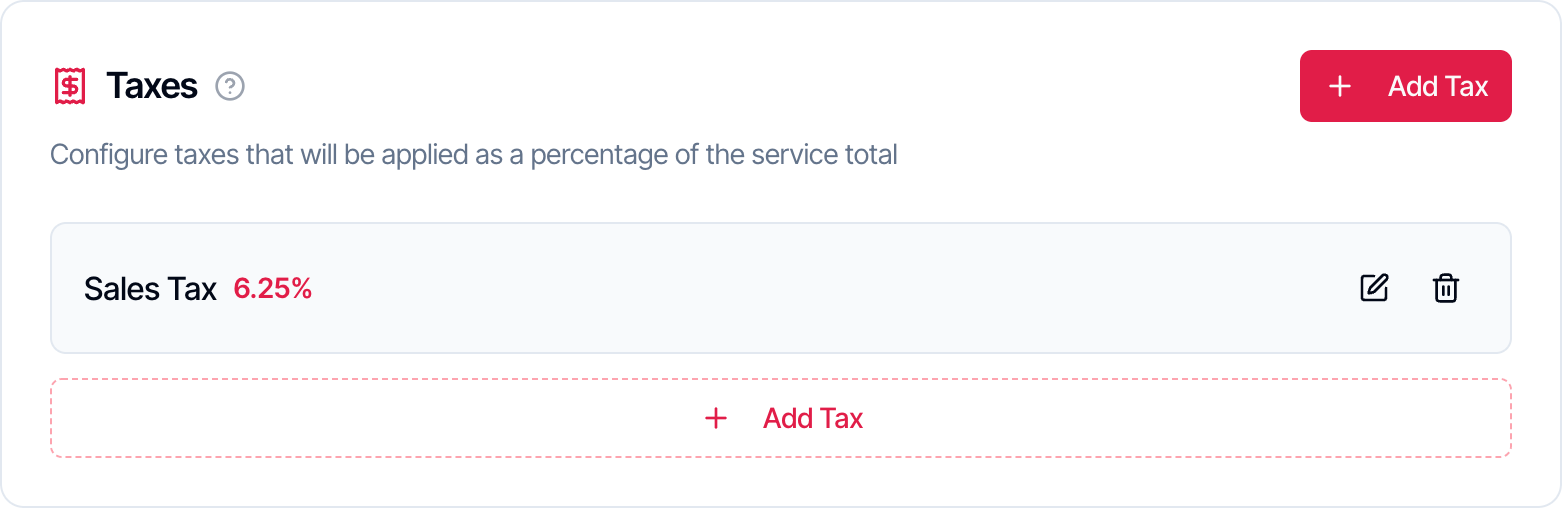
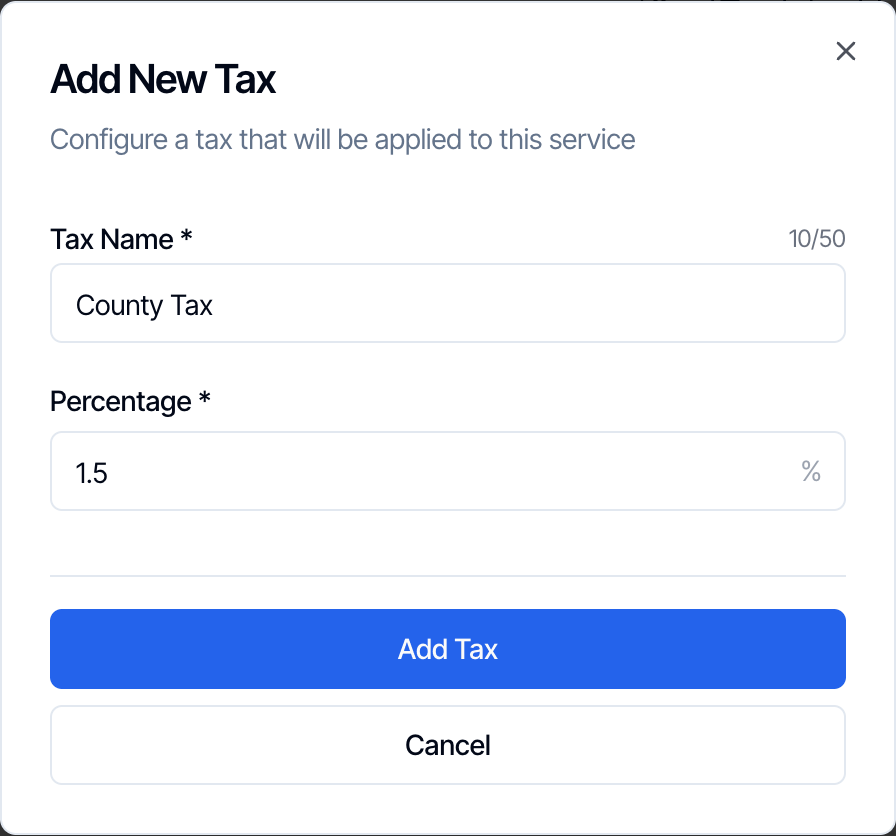
Hive keeps two decimal places, so a rate of 8.875% is saved as 8.88%.
What the tax is charged on
Hive adds up every line of the order before tax and charges the tax on that total:- the main service’s base price
- its modifiers, such as square footage or distance
- add-ons and their modifiers
- the urgent request surcharge
- lines your team adds with Edit Price or Duration, such as a trip fee
Example
Home Inspection $400, square footage $75, Radon Testing $150, and a 6.25% Sales Tax:Several taxes on one service
Each tax is charged on the same total before tax. Taxes aren’t charged on each other. For example, a State Tax of 4% and a County Tax of 1.5% on a $500 order are $20.00 and $7.50, so the total is $527.50.Where tax shows
- Your team
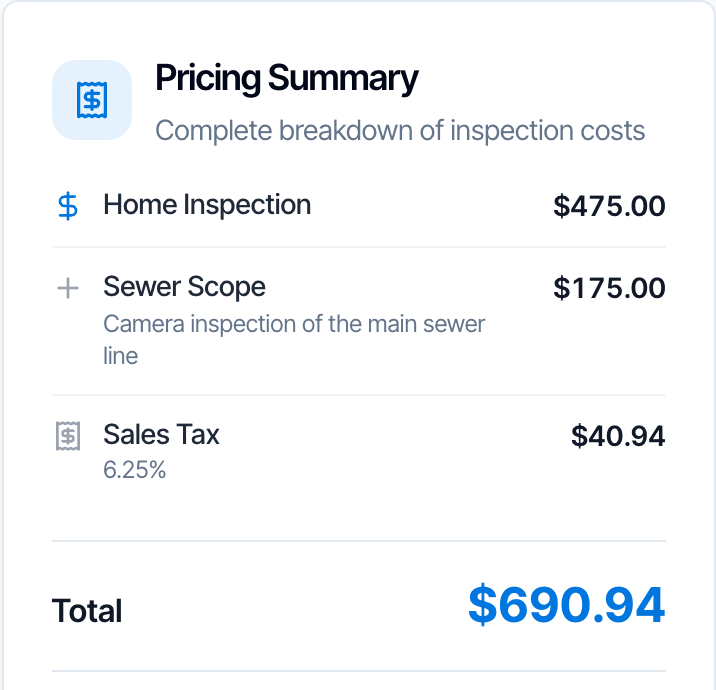
- Your clients
The Pricing Summary on the inspection shows each tax as its own line, marked tax, after all the other lines. The Total includes it.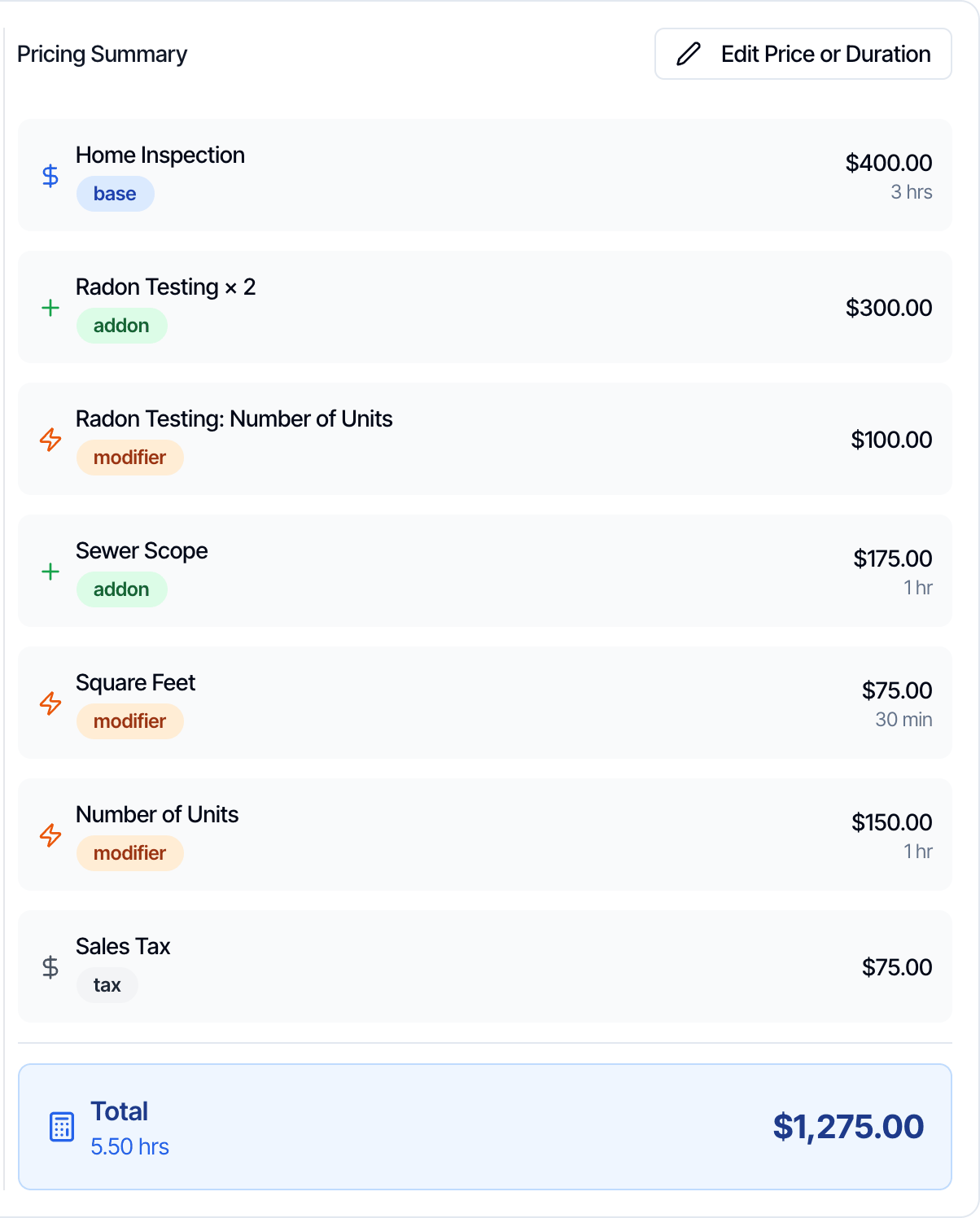
Inspections that are already booked
- Changing a tax in Services & Fees doesn’t change booked inspections on its own. They keep the tax they were booked with.
- Tax always follows the total. When your team edits a price, removes a line or adds a line on an inspection, the tax is worked out again on the new total.
- When the order changes, for example your team adds an add-on or a discount code, Hive prices the order again with the service’s current taxes. A new rate, a new tax or a removed tax then applies to that inspection.
- When a client adds an add-on from the review link or the client portal, the tax already on the order is worked out again on the new total.
- An inspection booked before you set up the tax doesn’t get it when the client adds an add-on. Ask in the chat bubble in your dashboard and we’ll help.
Discount codes and tax
Discount codes come off first and tax is charged on what’s left, in the dashboard and on online bookings alike.- A fixed code: a $50 code on a $500 order with 10% tax: $500 − $50 = $450, plus $45 tax = $495.
- A percentage code: 10% off the same order: $500 − $50 = $450, plus $45 tax = $495. The percentage is worked out on the services before tax.
- A code limited to some services or add-ons comes off those items only. Tax is then charged on the whole order after the discount.
- The urgent surcharge is 25% of the services after discount codes, and tax is charged on it too.
Tax-exempt clients
There is no tax-exempt setting for a client or an inspection. For clients who don’t pay tax, create a copy of the service without the tax and book them with that service:- On the Services & Fees page, click the copy icon on the service. The copy gets the same price, add-ons, modifiers and taxes, and ” - Copy” at the end of its name.
- Edit the copy: rename it, for example “Home Inspection (Tax Exempt)”, and delete its tax.
- To keep it off your online scheduler, tick Hidden on scheduler. Your team can still pick it in the dashboard.
- If any automations are limited to certain services, add the copy to them.
QuickBooks
If you use the QuickBooks integration, map each Hive tax to a QuickBooks tax code in the Tax setup card on the QuickBooks page. Tax then posts to QuickBooks as sales tax, not as service income. See QuickBooks: Sales tax.Frequently asked questions
Can I set one tax for my whole company?
Can I set one tax for my whole company?
No. Tax is set on each service. Add the same tax to every service you charge it on. When you copy a service, its taxes are copied too.
Is tax charged on add-ons?
Is tax charged on add-ons?
Yes. Add-ons have no tax of their own; the main service’s tax is charged on the whole order, add-ons and their modifiers included.
Why doesn't my online scheduler show tax?
Why doesn't my online scheduler show tax?
The online scheduler and the quote widget show an Estimated Total before tax. Tax is added when the inspection is booked, and shows on the review link and the invoice.
I added a tax but my booked inspections don't have it. Why?
I added a tax but my booked inspections don't have it. Why?
Tax is added when an inspection is priced. Inspections booked before you set up the tax don’t have it. Ask in the chat bubble in your dashboard and we’ll help.
I changed my tax rate. Do booked inspections change?
I changed my tax rate. Do booked inspections change?
Not on their own. They keep the tax they were booked with until your team changes the order in the dashboard, for example adds an add-on or a discount code. Hive then prices the inspection again with the current rate.
Can I charge two taxes, such as state and county?
Can I charge two taxes, such as state and county?
Yes. Add both to the service. Each is charged on the same total before tax, and each shows as its own line.
Can I remove tax for one client?
Can I remove tax for one client?
There is no tax-exempt setting. Book the client with a copy of the service that has no tax. See Tax-exempt clients.
Is the card processing fee taxed?
Is the card processing fee taxed?
No tax is charged on the card processing fee. Card fees are set up separately in Business Tools → Payments.
Next step
Related