

In the dashboard: open an inspection, then Fees and Payments → Show Invoice. Watch it in the Invoices video.
Hive makes the invoice for you as soon as an inspection is Confirmed, and keeps it up to date. You never build one by hand. This page covers where to find it, what’s on it, how your client gets it, and how to bill an agent or someone else for part of the fee.Find the invoice
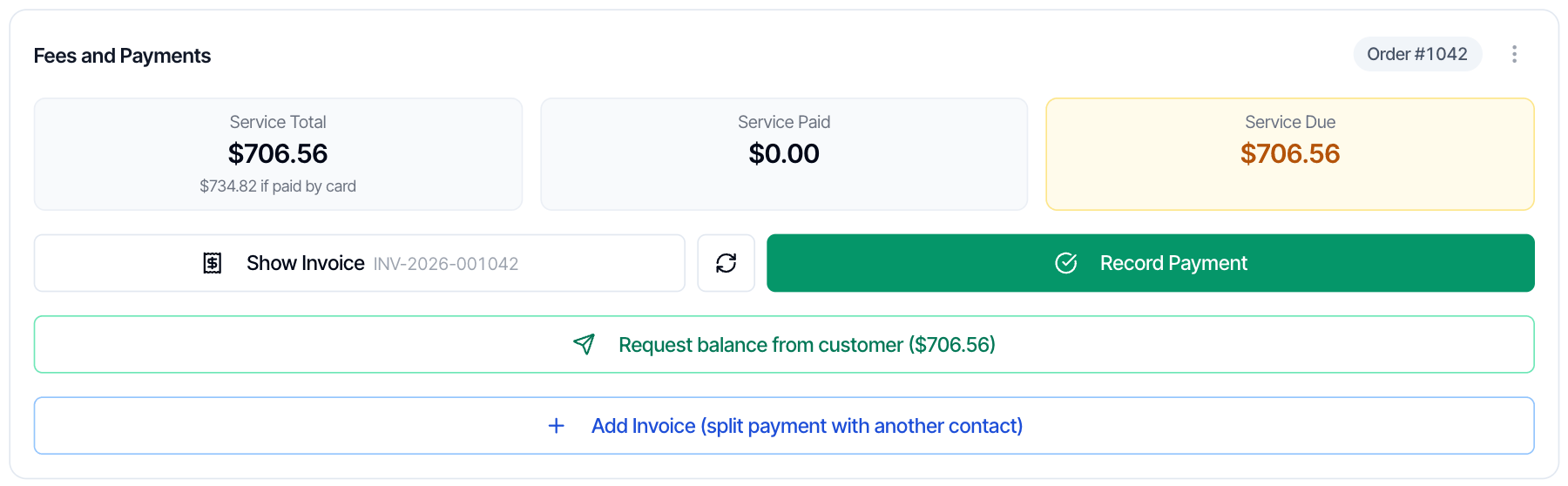
- Open the inspection and go to Fees and Payments.
- Click Show Invoice. The PDF opens in a new tab.
What’s on the invoice
The name under Bill To always comes from the client on the inspection. Which lines print, and how custom items and discounts show, is explained in What goes on the invoice.
When the invoice updates
The invoice rebuilds itself when the price, a payment, the inspection date or the address changes. If you fix the client’s name or email, click the refresh button next to Show Invoice (Regenerate invoice) to rebuild it straight away. The invoice number stays the same, and nothing is sent to anyone.How your client gets the invoice
There’s no Send Invoice button. Your client gets the invoice in these ways:- In their portal. The Payments section shows Show Invoice and Pay Invoice. Your payment link opens the same payment page.
- In your emails. Add the Invoice Link placeholder (
{{{invoice_link}}}) to an email. It always opens the latest version of the invoice, paid or unpaid. - As a PDF. Download it from Show Invoice and forward it yourself.
Send a receipt when the client pays
Open your Payment Received automation and insert the Invoice Link placeholder in the message. After the client pays, the link opens the paid invoice. See Automation settings and Placeholders.Take the Technology Fee off one invoice
Your company setting decides who pays the Technology Fee on every inspection. To change it for one inspection only:- In Fees and Payments, open the ⋮ menu (Payment options) and choose Credit card fee…
- Pick Absorb the fee. The client then pays the service total only, and the fee comes out of your payout.
- Click Save.
Company-wide invoice settings
Both live in Business Tools → Payments:- Absorb credit card fees decides who pays the Technology Fee on every inspection. See Who covers card fees.
- Invoice Business Text prints at the bottom of every invoice. Use it for your license number, tax ID, payment terms or email address. It goes on every invoice; there’s no separate note for one invoice, such as a P.O. number.
Ask the client for the rest
When the client still owes money, for example after you add a service on site:- Change the price in the Pricing Summary.
- Click Request balance from customer.
- Pick who to send it to, and send.
Bill an agent or someone else
The name on the invoice always comes from the client. If the agent, a seller or a relative is paying, keep the buyer as the client, then:- In Fees and Payments, click Add Invoice (split payment with another contact).
- Pick the person and the amount, for example $200 for the buyer’s agent.
- Preview the email, and send it.
Common questions
Can I make an invoice for just one service?
Can I make an invoice for just one service?
Hive makes one invoice per inspection, with every service on it. If someone needs an invoice for one service only, book that service as its own inspection.
Can I change where my invoice numbers start?
Can I change where my invoice numbers start?
Yes. Ask our support team from the chat bubble in your dashboard, and tell us the number you want to start from.
I fixed the client's name but the invoice still shows the old one.
I fixed the client's name but the invoice still shows the old one.
Click the refresh button next to Show Invoice to rebuild it. Changes to the price, payments, date or address update the invoice on their own; name and email fixes need the refresh.
How do I put my license number or a P.O. number on the invoice?
How do I put my license number or a P.O. number on the invoice?
Add your license number to Invoice Business Text in Business Tools → Payments. That text prints on every invoice, so there’s no place for a note on one invoice only, such as a P.O. number.
Can the agent see the invoice in their portal?
Can the agent see the invoice in their portal?
No. Agents don’t see invoices in their portal. Send them the Invoice Link placeholder in an email, or forward the PDF.
Do my invoices go to QuickBooks?
Do my invoices go to QuickBooks?
Yes, if you connect QuickBooks. Your invoices and payments are copied there. See QuickBooks.
Related
Fees and payments on an inspectionRecord payments, send payment links and read the Fees and Payments cardSplit paymentBill an agent, seller or relative for part of the feeTechnology FeeHow the card fee works on prices, invoices and refundsPayment settingsStripe, payment methods, card fees and invoice text