

In the dashboard: Business Tools → Subscriptions → Manage Subscription
You can cancel your Hive plan at any time from the web dashboard. Your plan keeps working until the end of the period you’ve already paid for, and you aren’t charged again. Cancelling doesn’t delete anything. Your reports, templates, contacts and past inspections stay in your account, and your clients can still open their reports. See What we do with your data.Before you cancel
- There’s no pause option. If you’re taking a break, cancel now and start a plan again when you’re back. For a slow season, the 10 Reports Package ($99 one-time, reports never expire) may suit you better. See Plans and prices.
- Unused time isn’t refunded. Plans renew automatically, so cancel before your renewal date to avoid the next charge. The date is under Renews in the Current Plan card.
- Your inspector seats end with the plan. To let just one inspector go, use Remove Inspector instead. See Remove a seat.
- Add-ons are billed separately. The Review Engine, Dedicated SMS Number and website maintenance plans are their own subscriptions. Cancelling your Hive plan doesn’t cancel them. See Cancel an add-on.
- Who can cancel: the account owner, or a team member with the Manage Subscriptions permission. See What each permission does.
Cancel your subscription
To cancel, go to the Subscriptions page and click Manage Subscription. You cancel on your billing page on Stripe, our payment processor.Open the Subscriptions page
In the web dashboard, go to Business Tools → Subscriptions. You can also click Plans at the bottom of the sidebar, or Subscriptions in the menu under your profile photo.You can’t cancel from the mobile app.
Click Manage Subscription
In the Current Plan card, click Manage Subscription. Your billing page on Stripe opens.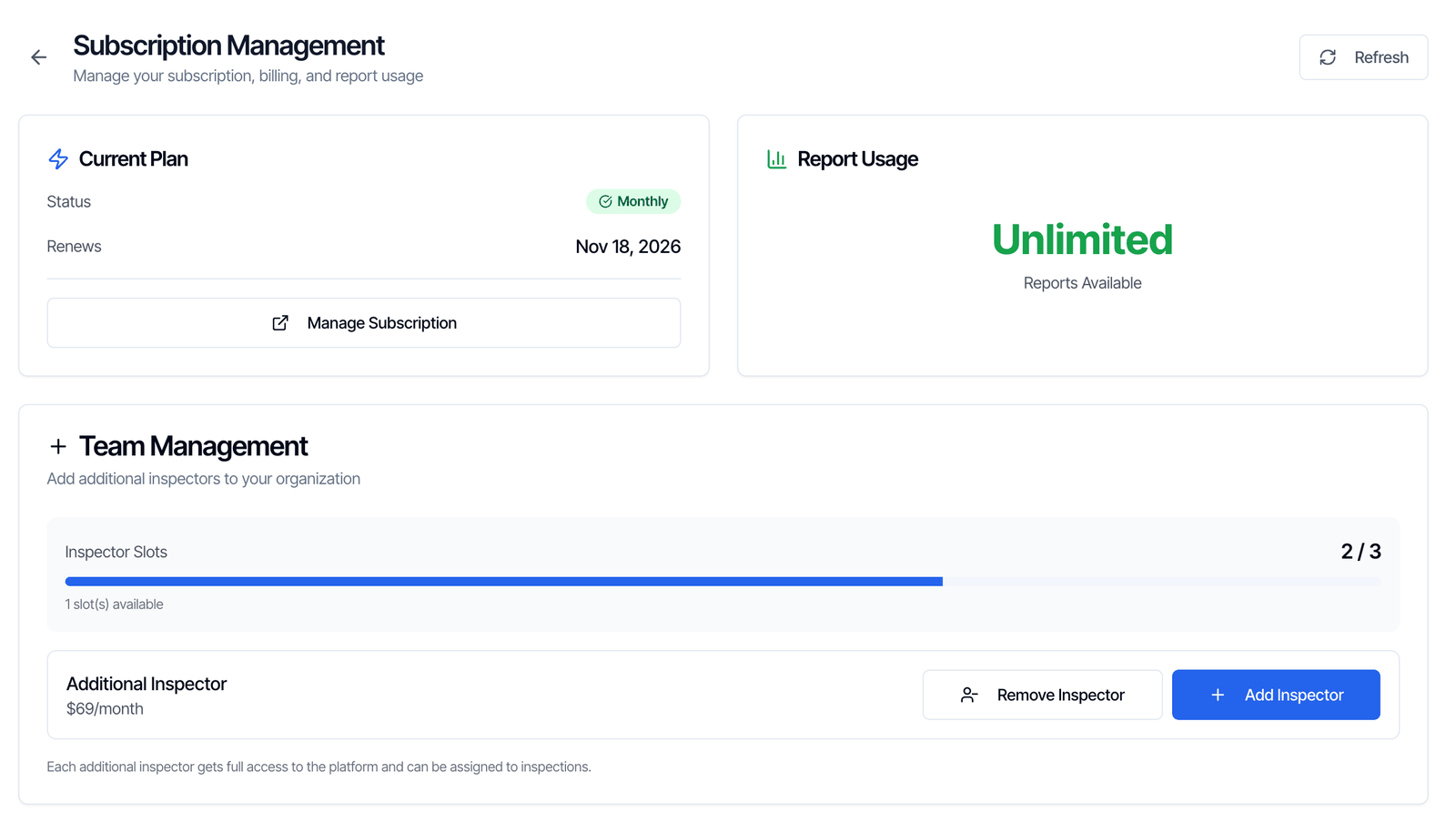
Cancel your plan on Stripe
Find your Hive plan, click Cancel subscription and confirm. Stripe shows the date your plan ends. It may also ask why you’re leaving; you can skip that question.
Don’t see Manage Subscription? It only shows once you’ve paid for something. On a free trial there’s nothing to cancel: if you don’t buy a plan, you’re never charged.
Cancel an add-on
Each add-on shows as its own subscription on the same Stripe billing page. Cancel each one you no longer want there:- Review Engine. Cancelling stops the billing. To stop review requests going out, also message us in the chat bubble and we’ll turn the Review Engine off for you.
- Dedicated SMS Number. Cancel it the same way.
- Website maintenance plan. Cancel it the same way. We can hand over your site’s text and photos at no extra cost. Email website@hiveinspect.com. See Website services.
Changed your mind?
Before your plan ends, go to Business Tools → Subscriptions, click Manage Subscription, and click Don’t cancel on your Stripe billing page. Your plan then renews as normal. After your plan has ended, pick a plan on the Subscriptions page to start again. See Coming back later.When your plan ends
On the end date Stripe showed you, your plan stops. Here’s what changes: What keeps working:- Signing in to the web dashboard and the mobile app
- Opening your past inspections and reports, and viewing their PDFs
- Your templates, contacts, settings and team list
- Your clients’ and agents’ report links and portal. They can still open reports, download PDFs, sign agreements and pay invoices.
- Creating new inspections. The dashboard shows Subscription Limit Reached; the mobile app shows No reports remaining.
- Your online scheduler and quote widget. Clients see Online Scheduling Temporarily Unavailable or Online Quoting Temporarily Unavailable and are asked to call or email you.
- Online booking from your public page.
- Your inspector seats.
What we do with your data after you cancel
We keep it. Cancelling your subscription doesn’t delete anything, and there’s no time limit. Everything stays in your account, exactly as you left it:- Your reports, their PDFs, and every photo and video in them
- Your inspections, with their agreements, signatures, invoices and payment records
- Your templates and saved comments
- Your contacts, agents and brokerages
- Your settings, automations and team
Coming back later
Start any plan on the Business Tools → Subscriptions page. All your data is where you left it, so you can pick up straight away. A few things don’t carry over:- Inspector seats. They ended with your old plan. Add the seats you need with Add Inspector. See Add a seat.
- Leftover trial or package reports. Free trial or 10 Reports Package reports you had before your first Monthly or Annual plan don’t come back.
Keep your own copy
You don’t need to download anything before you cancel. If you want a copy outside Hive anyway:
There’s no single button that downloads every report at once.
Delete your account and data
There’s no delete button in Hive. If you want your data removed for good:- Cancel your plan and any add-ons first, so you aren’t charged again.
- From the account owner’s login, message us in the chat bubble, or email support@hiveinspect.com.
Common questions
Can I pause my subscription instead?
Can I pause my subscription instead?
No, there’s no pause option. Cancel your plan and start a new one when you’re ready. Your data waits for you. For a quiet few months, the 10 Reports Package lets you pay only for the inspections you do.
Do I get a refund for the rest of my month or year?
Do I get a refund for the rest of my month or year?
No. Your plan keeps working until the end of the period you paid for, but unused time isn’t refunded. Cancel before your renewal date to avoid the next charge. See our Subscription Agreement.
Can my clients still see their reports after I cancel?
Can my clients still see their reports after I cancel?
Yes. Your clients and agents can still open the reports you sent them, download the PDFs, sign agreements and pay invoices. Their links don’t depend on your plan.
Do you delete my data when I cancel?
Do you delete my data when I cancel?
No. We keep your reports, photos, templates, contacts and inspections, with no time limit. Your data is only deleted if you ask us to delete your account. See What we do with your data.
Does cancelling my plan cancel my Review Engine, SMS number or website?
Does cancelling my plan cancel my Review Engine, SMS number or website?
No. Each one is a separate subscription. Cancel each one on your Stripe billing page. See Cancel an add-on.
I cancelled but I was still charged. Why?
I cancelled but I was still charged. Why?
Check these first:
- You cancelled after your renewal date. The renewal was charged before the cancellation.
- The charge is for an add-on. The Review Engine, Dedicated SMS Number and website plans bill separately. Your Stripe billing page lists every active subscription.
- You have an unpaid invoice from before you cancelled.
Can I switch from monthly to annual instead of cancelling?
Can I switch from monthly to annual instead of cancelling?
Yes. There’s no switch button: you cancel the current plan, then start the new one. See Switch between monthly and annual.