

In the dashboard: Teams (sidebar)
The Teams page, titled Hive Teams, is where you add people to your company and decide what each of them can do. Everyone on your team signs in with their own email and password.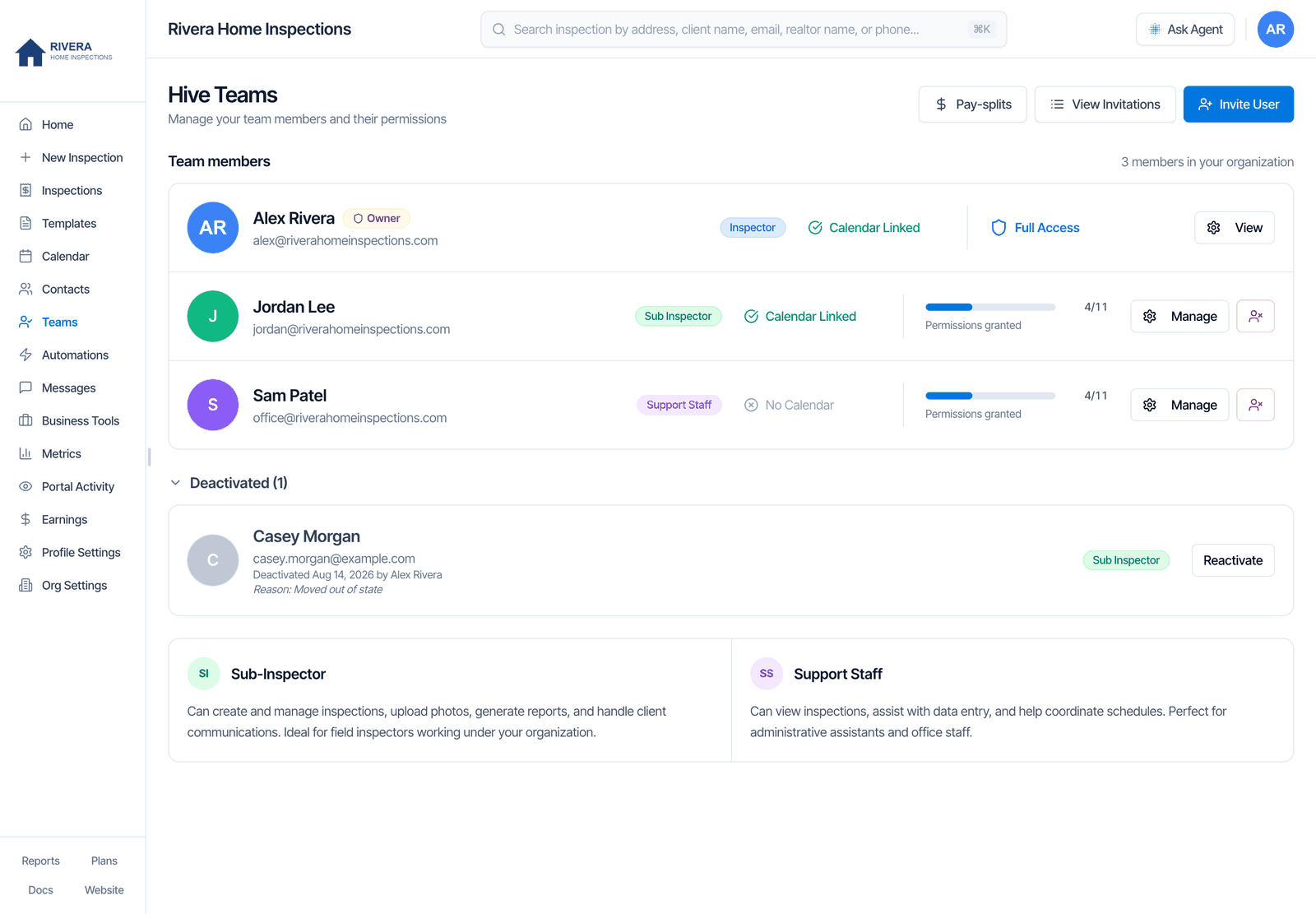
Who can open Teams
The owner, and anyone with the Manage Team permission. Everyone else sees Access Denied: You don’t have permissions to manage team members. Contact your organization owner for access.Roles and seats
Each person has one role. You pick it when you invite them.- A role can’t be changed later. To change someone from support staff to sub-inspector, ask our team in the chat bubble.
- Seats are added under Business Tools → Subscriptions → Team Management → Add Inspector. You need the Monthly or Annual plan. See Seats and billing.
- Ownership can’t be moved to someone else from the dashboard. If your company changes hands, ask our team in the chat bubble.
What each row shows
Invite a team member
Add a seat first, for an inspector
For a sub-inspector, add a seat under Business Tools → Subscriptions → Team Management → Add Inspector. Support staff don’t need one.
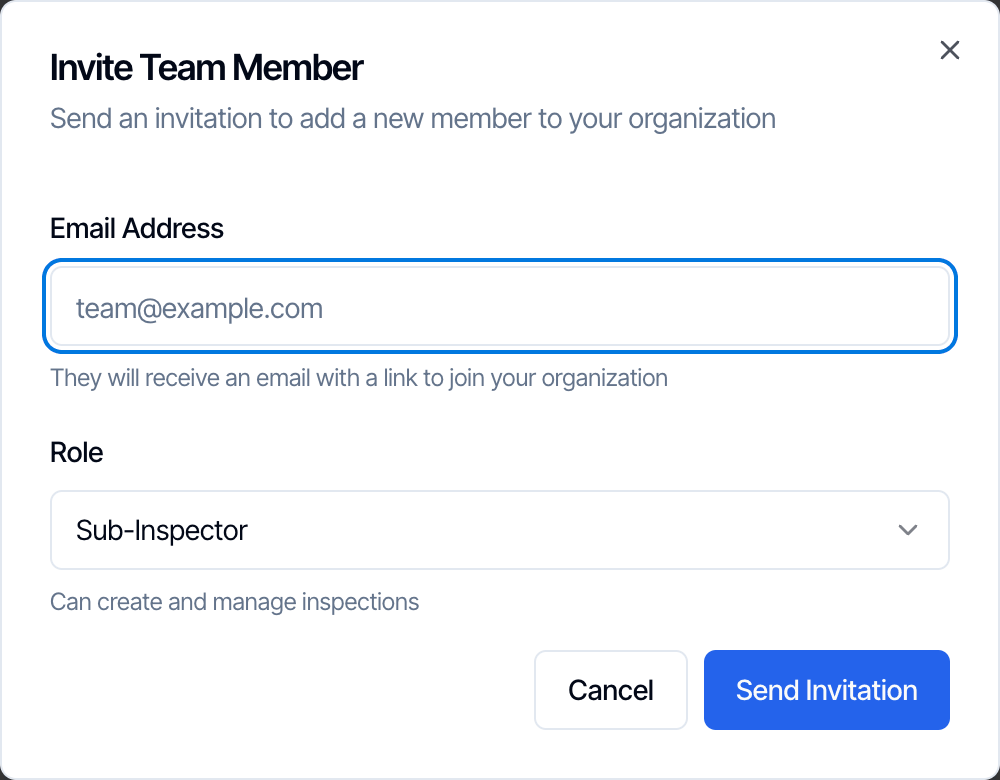
Enter their email and pick a role
Type their Email Address, choose Sub-Inspector or Support Staff under Role, and click Send Invitation. You see Invitation Sent.
They accept
They get an email, You’re invited to join [your company] on HiveInspect. They click the link, enter their name, choose a password and agree to the terms. Then they sign in on the web dashboard or the mobile app.
Set their permissions
Once they’ve joined, they show on the Teams page. Click Manage to choose what they can do. See Set permissions.
- The invitation link works for 7 days.
- Seats are checked when they accept, not when you send. If you have no free inspector seat, the sub-inspector sees that your company has reached its maximum number of inspectors and can’t join until you add a seat.
- One email, one company. If the email already has its own Hive account, you see This user already belongs to another organization. Invite them with a different email, or ask our team in the chat bubble. See My invite says the person already belongs to another organization.
- Someone who left your team can’t be invited again. You see a message asking you to reactivate them from Teams → Deactivated. See Reactivate someone.
- An invitation is already waiting: if you invite the same email twice, Hive asks you to resend the first one instead.
View, resend or revoke invitations
Click View Invitations to see every invitation you’ve sent.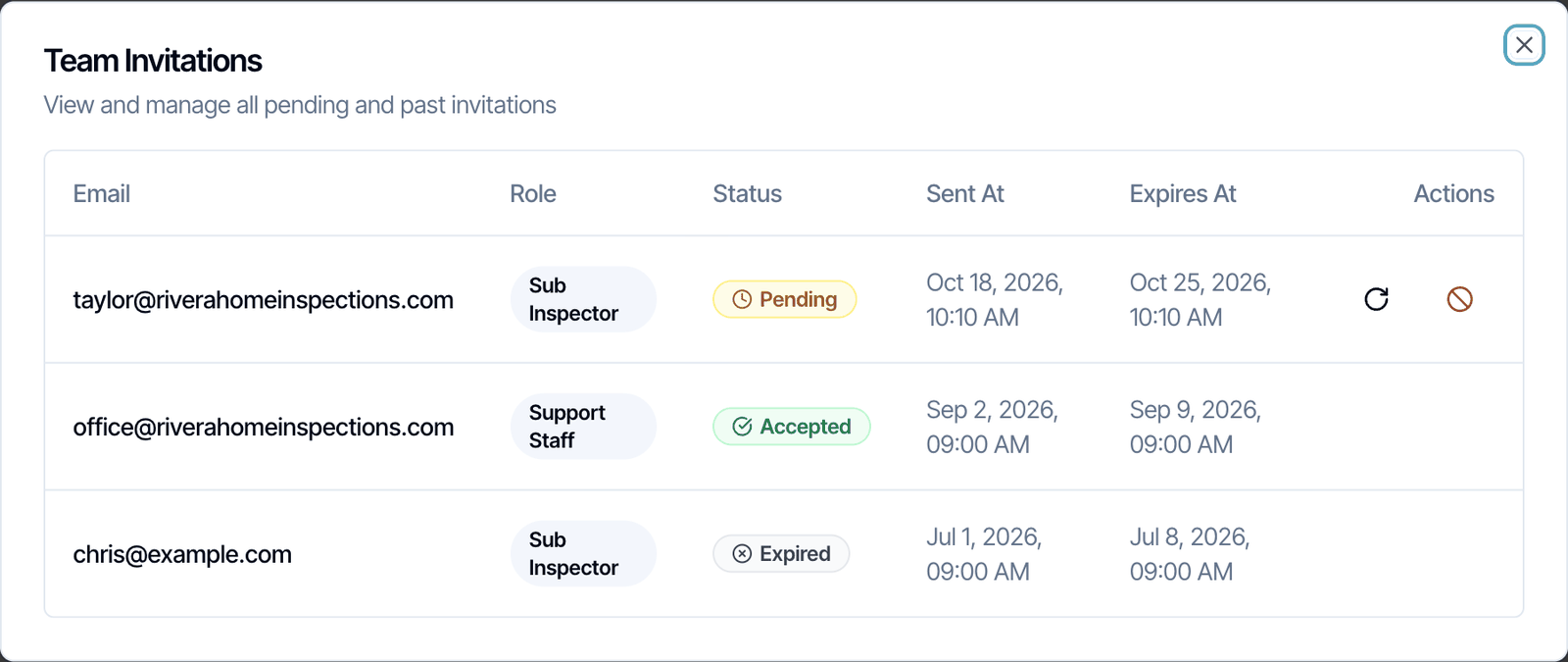
- Status: Pending (not accepted yet), Accepted, Expired or Revoked. Expiring soon shows under the date when less than a day is left.
- Resend (circular arrow): sends the same email again. If the link has expired, it gets another 7 days. Use this when someone can’t find the email; ask them to check their spam folder too.
- Revoke (circle with a line): cancels the invitation so the link stops working. Only the person who sent an invitation can revoke it.
Set permissions
Turn permissions on or off
Flip the switches. Select All turns them all on, and Clear All turns them all off.
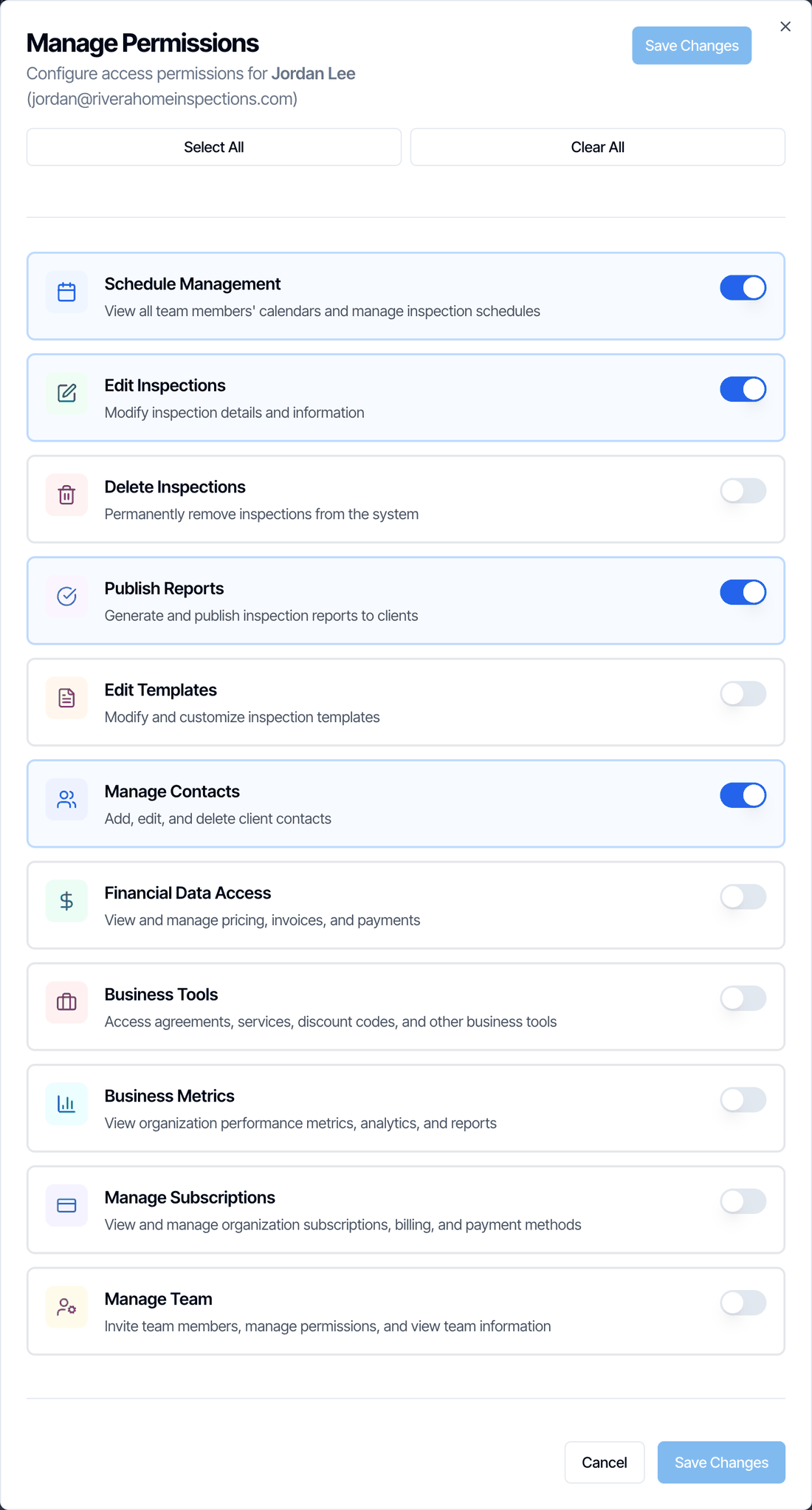
What each permission does
The owner can always do everything.
Org Settings isn’t limited by permissions. Anyone on your team who signs in can open Org Settings and change it.
Common setups
Deactivate someone who leaves
Deactivating removes a person from your active team but keeps their history. You can deactivate sub-inspectors and support staff. The owner can’t be deactivated.Click the red person button
On the Teams page, click the red button at the end of their row. Hive checks their inspections.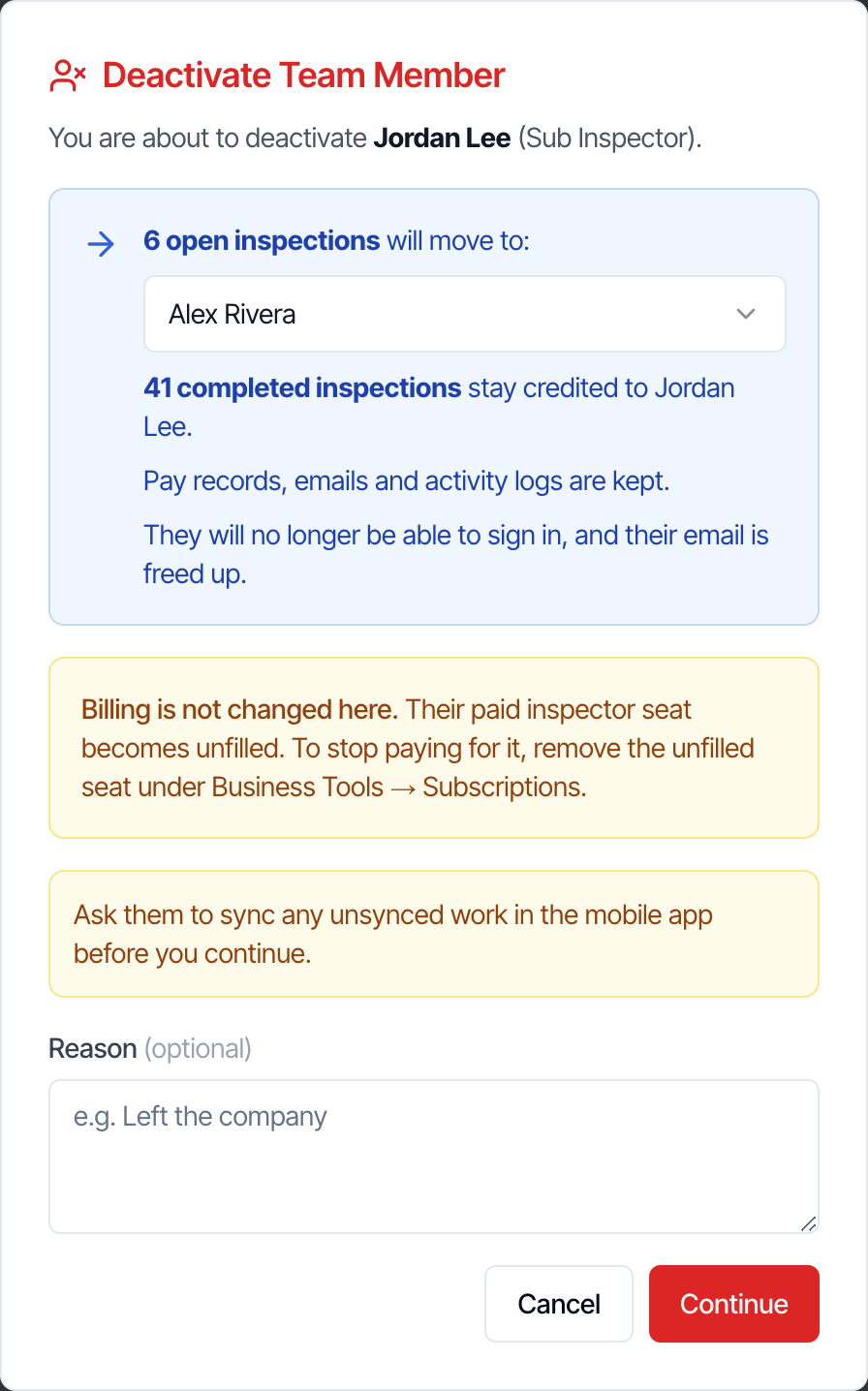
Choose who gets their open inspections
Pick the inspector their open inspections move to. You can add a Reason, such as Left the company. Click Continue.
To stop paying for the seat, go to Business Tools → Subscriptions → Team Management, click Remove Inspector and remove the unfilled seat. Seats aren’t refunded for the part of the billing period already paid.
Remove Inspector on the Subscriptions page can also deactivate a sub-inspector and remove their seat in one step.
Reactivate someone
Deactivated people are listed under Deactivated on the Teams page, with the date, who deactivated them and the reason. Click the heading to open the list.Free a seat, for an inspector
A sub-inspector needs a free inspector seat. Add one under Business Tools → Subscriptions first if you have none.
Click Reactivate
Click Reactivate next to the person. Their old email is filled in. Change it if they should sign in with a different email.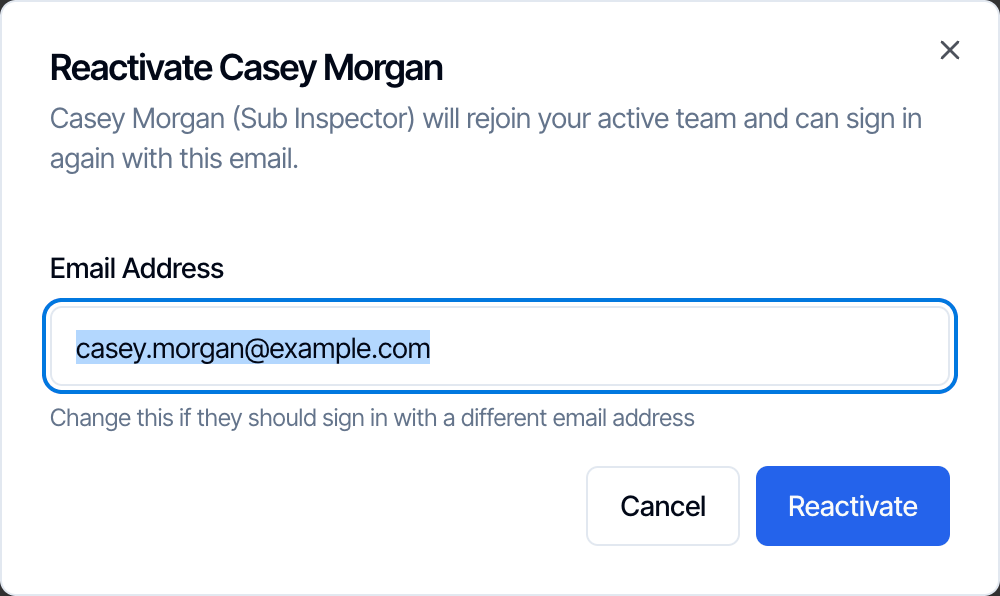
- No free seat: you see No inspector seat is available. Add a seat under Business Tools → Subscriptions, then reactivate.
- Email taken: if someone else now has a Hive account with that email, you see That email now belongs to another Hive account. Enter a different email.
- Inspections don’t move back. Open inspections that were moved to someone else stay with that person. Change the inspector on each one if needed.
Team availability
The Team Settings button at the top of Profile Settings opens a page also called Team Settings. There you can edit the profile and schedule of every inspector on your team. You need to be the owner or have Schedule Management.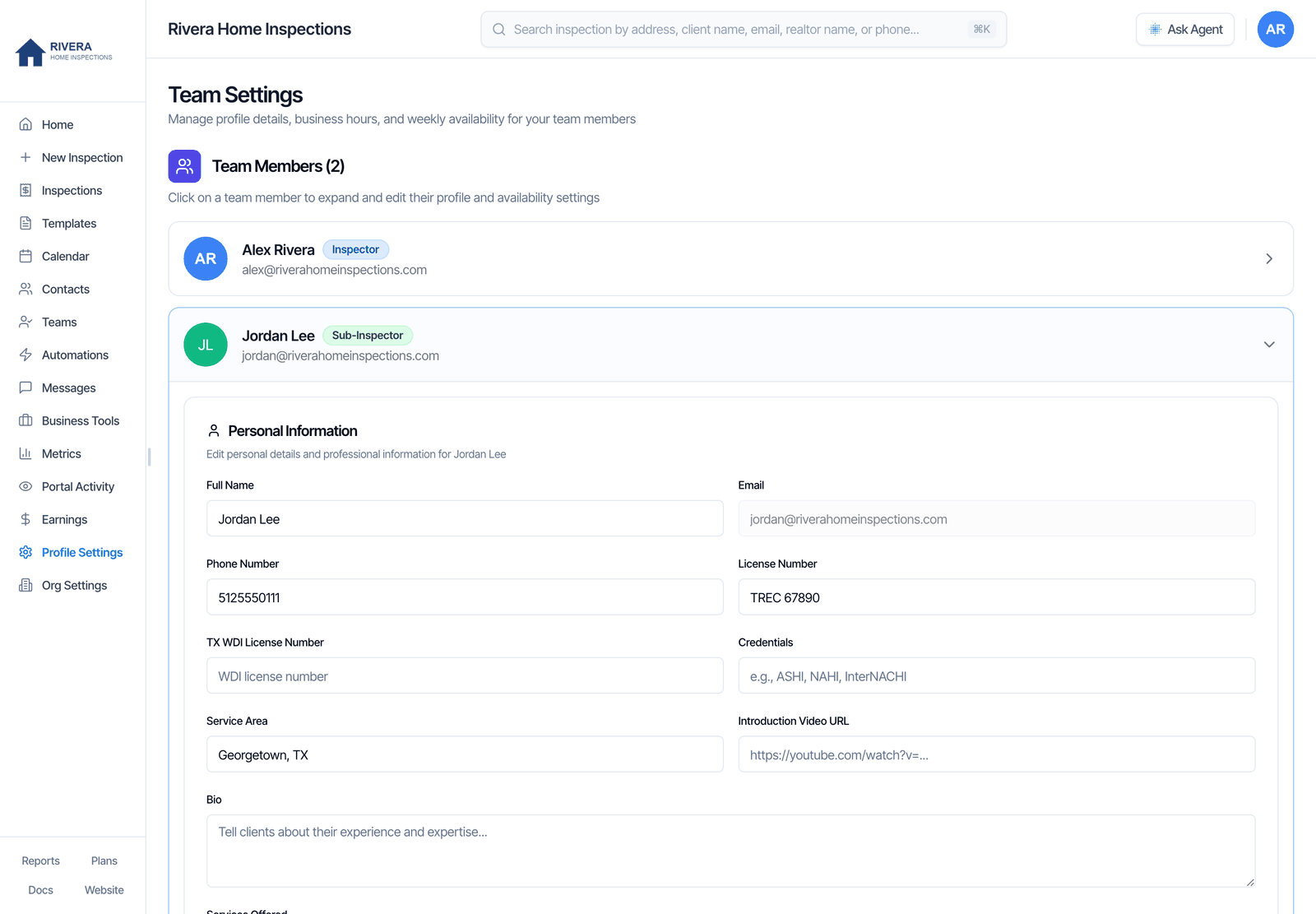
- Personal Information: Full Name, Phone Number, License Number, TX WDI License Number, Credentials, Service Area, Introduction Video URL, Bio, Services Offered, Profile Photo and Signature. Their email can’t be changed here.
- General Business Hours, Weekly Availability Schedule and Inspector Local Address with Maximum Travel Distance, the same as in Profile Settings.
Pay-splits
Pay-splits at the top of the Teams page opens the page where you set how each inspection’s pay is split across your team. See Sep 27, 2026 updates.FAQ
How do I add another inspector?
How do I add another inspector?
Add a seat under Business Tools → Subscriptions → Team Management → Add Inspector, then go to Teams, click Invite User, enter their email, choose Sub-Inspector and click Send Invitation.
Do office staff need a paid seat?
Do office staff need a paid seat?
No. Invite them as Support Staff. They don’t take an inspector seat. Turn on Schedule Management so they can see and book everyone’s inspections.
My office manager can't see any inspections. Why?
My office manager can't see any inspections. Why?
They don’t have Schedule Management. Without it, a person only sees inspections they’re assigned to, and support staff are never assigned. Turn it on in Teams → Manage and click Save Changes.
The person never got the invitation email.
The person never got the invitation email.
Ask them to check spam and promotions. Then open View Invitations and click resend next to their email. Make sure the email is spelled right; if not, revoke it and send a new invitation.
The invitation link expired.
The invitation link expired.
Open View Invitations and click resend next to their email. The link gets another 7 days.
Can I stop a team member from publishing reports?
Can I stop a team member from publishing reports?
The Publish Reports switch isn’t checked by Hive yet, so turning it off doesn’t stop them. To make sure reports are finished before anyone publishes, turn on Require completed sections to publish in Org Settings.
Can I change someone's role?
Can I change someone's role?
Not from the Teams page. Ask our team in the chat bubble.
How do I remove someone and stop paying for them?
How do I remove someone and stop paying for them?
Deactivate them on the Teams page, then remove the unfilled seat under Business Tools → Subscriptions → Team Management → Remove Inspector.
Can a deactivated person still sign in?
Can a deactivated person still sign in?
No. They’re signed out straight away and can’t sign in until you reactivate them.
Can someone belong to two companies?
Can someone belong to two companies?
No. One email belongs to one Hive company. Use a different email for the second company.
How do I change another inspector's hours or start times?
How do I change another inspector's hours or start times?
Click Team Settings at the top of Profile Settings, open the inspector, make your changes and click Save All for [first name]. You need to be the owner or have Schedule Management.