Recommendation Services: The Trades You Recommend on Defects
Manage the list of services, such as Plumbing Contractor or Roofing Professional, that you pick on defect comments in Hive Inspect. Add, rename, reorder and delete services, see where the list shows up in the web and mobile report editors, how the service appears in the digital report and the PDF, and how to hide it from clients.
In the dashboard: Business Tools → Recommendation Services
Every defect comment in Hive can name the kind of professional who should look at it, for example Plumbing Contractor, Electrical Contractor or Roofing Professional. That’s the comment’s recommendation service. Your client sees it on the defect in the digital report and the PDF, and it’s how Hive matches defects to your recommended contractors.Recommendation Services is your company’s list of those services. It’s the list you pick from in the template editor, the web report editor and the mobile app. Change it here, and every one of those dropdowns changes with it.
Every company starts with 67 common services, from Air Duct Cleaning to Window Repair and Installation Contractor, plus No Recommendation. They’re in alphabetical order to begin with. Make the list yours:
Add the trades you recommend that aren’t there, such as Sewer Scope Specialist.
Drag a service by the handle on its left. The order saves by itself.The dropdowns in the template editor, the web report editor and the mobile app list services in this order. Put the trades you pick most often, such as Plumbing Contractor, Electrical Contractor and Roofing Professional, at the top so you don’t scroll through the whole list on every defect.
Click the pencil on the service, change the Service Name or the description, and click Save Changes.A rename changes the name everywhere the service is used, because Hive saves the service on each comment, not its name. Comments that already use it stay linked to it, and they show the new name:
in your templates and in the web and mobile report editors
in your clients’ digital reports, including reports you’ve already published
in new PDFs. A PDF that was already made keeps the old name until it’s made again, for example when you publish the report again.
Click the red trash button on the service and confirm Delete.Deleting a service takes it out of the dropdowns. It doesn’t change anything that already uses it:
Template comments and report comments that already have the service keep it, and your client still sees it.
Recommended contractors tagged with it keep it, and clients can still find them from those defects.
You just can’t pick it for new comments any more.
If you rename a service and later delete it, comments that used it go back to a name based on the service’s original name, the one it had when it was added. To stop using a service everywhere, change it on your template comments first (see Set one service for every defect comment), then delete it.
You can’t undo a delete. To bring a service back, add it again.
Changes on this page reach every place you pick a service. You don’t have to edit your templates or reports one by one.
Template editor
Web report editor
Mobile app
Open a template, then open a defect comment with the pencil, or click New Comment in the Defects/ Deficiencies group. Pick the service under Defect/ Deficiency Service, below the category.The service you pick on a template comment is copied into every new report made from the template. The window loads your latest list each time you open it.
In the report editor, open a defect comment with the arrow on its right. Pick the service under Recommendation Service, below the category buttons.When you add a new defect comment to a report, choose its Service Type in the add window. It’s required there.The editor loads your list when it opens. If you change the list while a report is open, refresh the page to see the change.
In the mobile app, the service is on each defect comment in the report, next to the category button. Tap it to choose from your list. When the list is longer than 10 services, a search box appears at the top.When you add or edit a comment, or review a Smart Add result, pick the service under Defect/ Deficiency Service. It starts at No Recommendation.The app downloads your list when it starts with an internet connection, and keeps a copy so it works offline. After you change the list in the dashboard, close the app completely and open it again, or sign out and back in, to get the new list.
One comment: open it and pick a different service, as shown above.
Every defect comment in a template at once: open the template’s Template Tools and use Set one service for all defect comments. See Template Tools.
Changing a template comment changes new reports only. Reports you’ve already started keep the service they had. Change those in the report editor.
Comments written with Comment Assist, including the ones Smart Add writes, start with No Recommendation. Pick the service before you publish, so your client sees who to call and the right contractors show up.
The service shows on each defect in the reports your client gets. No Recommendation never shows.
Digital report
PDF
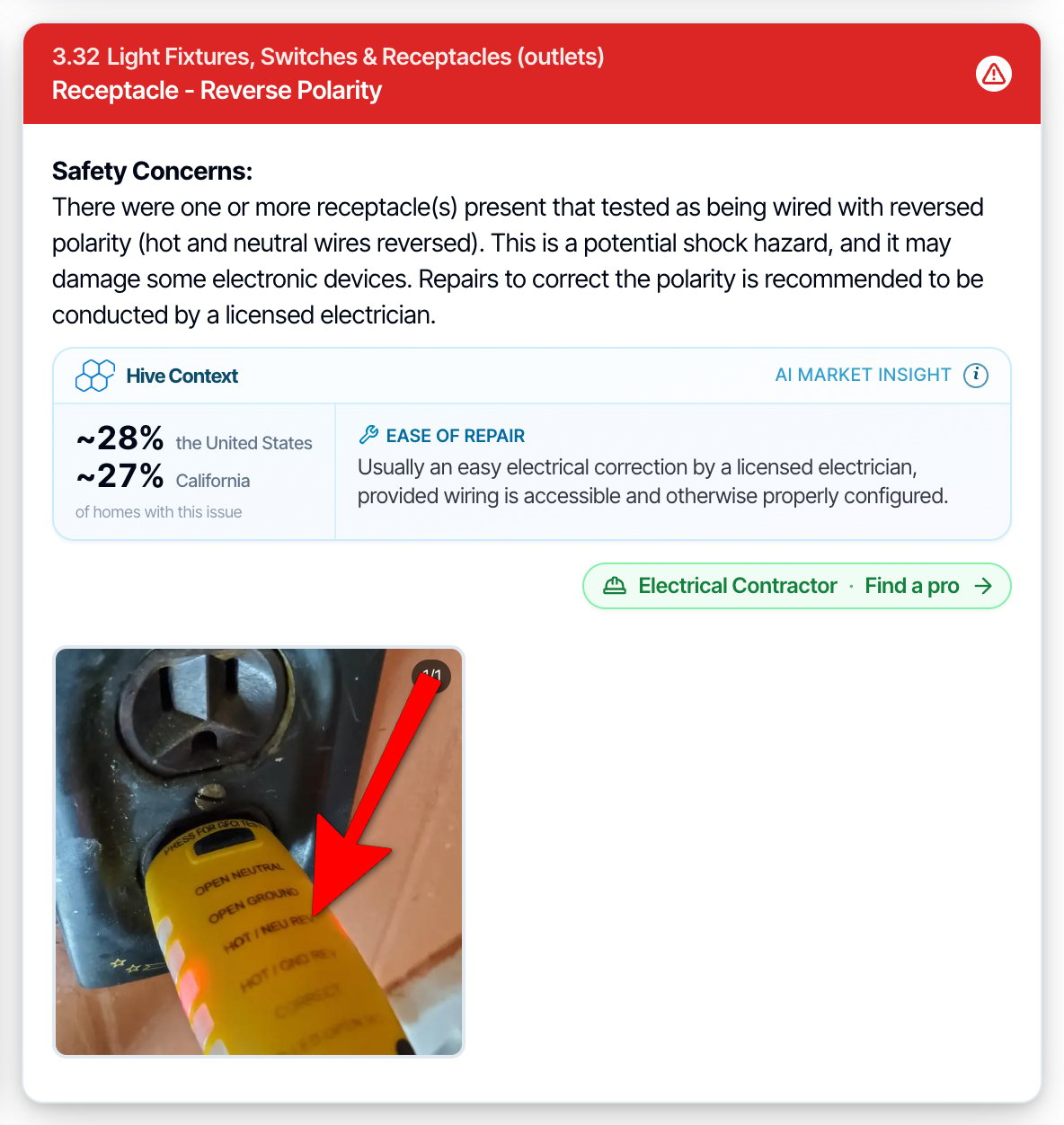
The service is the green label under the defect’s description, for example Handyman.If you’ve added a recommended contractor for that service, the label becomes a button that reads Find a pro, for example Electrical Contractor · Find a pro. Your client clicks it to see your contractor’s phone number, email and website.The service also shows in the View Summary view, and in the defect’s Read more window.
In the PDF, each defect has a gray Service: line under its title, for example Service: Electrical Contractor. The summary PDF shows it the same way.Recommended contractors aren’t in the PDF. Your client finds them in the digital report.
In the defects summary. The summary at the top of the report lists each defect on one line, without the service. If you turn on Detailed Summary Items in Report Customization, each item also shows Recommended: and the service, in the digital report and the PDF.The service also shows in re-inspection reports, in the repair addendum (Service Required:), and in TREC reports (Recommended Service:). The Repair Estimator uses it to decide which trade’s prices to use.
The green label and the Find a pro button disappear from every defect, so clients can’t open your contractors from the report.
The Get repair quotes section at the end of the digital report disappears.
The Service: line disappears from the PDF, and Recommended: disappears from the detailed summary.
The repair addendum your client or their agent builds doesn’t show the service, on screen or in its PDF (Service Required:). An addendum PDF made before you turned the setting on keeps the service until it’s generated again.
You still pick services while you write, in the template editor, the web report editor and the mobile app. Turning it off later shows the services again. Nothing is lost.You can also just leave defects on No Recommendation. Your client then sees nothing for those defects, but you lose the contractor matching.
Team members who can open Business Tools can add, rename, reorder and delete services. Everyone who writes reports picks from the list. See Team permissions.The list belongs to your company. Every inspector on your team sees the same services in the same order.
I changed my list, but the mobile app still shows the old one.
The app gets your list when it starts. Close the app completely (swipe it away), make sure you have internet, and open it again. Signing out and back in also works.
I changed my list, but the report editor still shows the old one.
Refresh the report editor page. It loads the list when it opens. The template editor’s comment window loads the newest list every time you open it.
Will renaming a service change reports I've already sent?
Yes, the digital report shows the new name the next time it’s opened. A PDF that was already made keeps the old name until it’s made again.
I deleted a service. What happens to defects that used it?
Nothing changes. They keep the service and your client still sees it. You just can’t pick it for new comments.In the template editor and the web report editor, the deleted service still shows on those comments, at the top of the dropdown, so you can see what they use. The mobile app shows it in a code-like format (for example pest_control_pro). The comment keeps the service until you pick another one.
Can I delete No Recommendation?
No. It’s needed for defects that don’t need a professional, and it’s the starting value in the mobile app. You can rename it or drag it to another spot in the list.
Can a defect have more than one service?
No. Each defect comment has one service. Mention a second trade in the comment text.
Can two services have the same name?
Yes, but avoid it. They’re two separate services, so you and your contractors could pick different ones by mistake.
Does Hive choose the service for me?
No. Comments written with Comment Assist, including Smart Add’s, start with No Recommendation. When you merge comments with Comment Merge, the merged comment takes the service of one of the comments you merged. Check it before you publish.
Does the list change my recommended contractors?
It’s the list you tag contractors with. Renaming a service renames it on your contractors too, and they stay matched. Deleting a service doesn’t remove it from contractors already tagged with it. See Recommended Contractors.
{"docsConfig":{"theme":"aspen","$schema":"https://mintlify.com/docs.json","name":"Hive Inspect","description":"Hive Inspect documentation: setup guides, how-tos, and product updates for the AI-powered home inspection software used by professional home inspectors.","colors":{"primary":"#0166c2","light":"#3496f0","dark":"#0b6cc9"},"logo":{"light":"https://mintcdn.com/hiveinspect-43c85ed1/ksh3AYooN6qduiUo/images/logo-light.png?fit=max\u0026auto=format\u0026n=ksh3AYooN6qduiUo\u0026q=85\u0026s=8f6b67a712bb44d172f8984ee41b347b","dark":"https://mintcdn.com/hiveinspect-43c85ed1/ksh3AYooN6qduiUo/images/logo-dark.png?fit=max\u0026auto=format\u0026n=ksh3AYooN6qduiUo\u0026q=85\u0026s=5c683dc6ab6224243079e62d40d6a8d5"},"favicon":"https://mintcdn.com/hiveinspect-43c85ed1/5oY9t9U2Yz0VU8mn/images/favicon.png?fit=max\u0026auto=format\u0026n=5oY9t9U2Yz0VU8mn\u0026q=85\u0026s=968e26fd124ca52d19751518395a029d","api":{"playground":{"display":"none"},"examples":{"defaults":"required","languages":["curl","python","javascript"]}},"appearance":{"default":"system","strict":false},"background":{"color":{"light":"#fcfcfd","dark":"#0f1217"}},"navbar":{"links":[{"href":"https://www.facebook.com/groups/1202950231646461","label":"Inspector community"},{"href":"https://www.hiveinspect.com","label":"Get 5 free reports"}],"primary":{"type":"button","label":"Open dashboard","href":"https://dashboard.hiveinspect.com"}},"footer":{"socials":{"instagram":"https://www.instagram.com/hive.inspect","facebook":"https://www.facebook.com/profile.php?id=61577925876518","youtube":"https://www.youtube.com/@hiveinspect","linkedin":"https://www.linkedin.com/company/hive-inspect"},"links":[{"header":"Get help","items":[{"label":"Inspector community on Facebook","href":"https://www.facebook.com/groups/1202950231646461"},{"label":"Ask in the chat bubble","href":"https://dashboard.hiveinspect.com"},{"label":"Request a feature","href":"https://dashboard.hiveinspect.com/dashboard/business-tools/feature-requests"}]},{"header":"Get the app","items":[{"label":"Hive Inspect on the App Store","href":"https://apps.apple.com/us/app/hive-inspect/id6737940474"},{"label":"Hive Inspect on Google Play","href":"https://play.google.com/store/apps/details?id=com.singaporv.estategpt"}]},{"header":"Hive Inspect","items":[{"label":"Pricing","href":"https://www.hiveinspect.com/pricing"},{"label":"Features","href":"https://www.hiveinspect.com/features"},{"label":"Compare","href":"https://www.hiveinspect.com/compare"}]},{"header":"Legal","items":[{"label":"Privacy policy","href":"https://www.hiveinspect.com/privacy"},{"label":"Terms of service","href":"https://www.hiveinspect.com/terms"},{"label":"Subscription agreement","href":"https://www.hiveinspect.com/subscription-agreement"},{"label":"SMS compliance","href":"https://www.hiveinspect.com/sms-compliance"},{"label":"EULA","href":"https://www.hiveinspect.com/eula"}]}]},"search":{"prompt":"Search, e.g. reschedule, TREC"},"seo":{"metatags":{"og:image":"https://docs.hiveinspect.com/images/og-cover.png","og:image:width":"1200","og:image:height":"630","og:image:alt":"Hive Inspect home inspection software on laptop, tablet, and phone","og:locale":"en_US","twitter:card":"summary_large_image","twitter:image":"https://docs.hiveinspect.com/images/og-cover.png","twitter:image:alt":"Hive Inspect home inspection software on laptop, tablet, and phone","author":"Hive Inspect","msvalidate.01":"72D895BDDEC4A34D44A2F5971922D98A","robots":"index, follow","googlebot":"index, follow, max-image-preview:large, max-snippet:-1, max-video-preview:-1"},"organization":{"id":"https://www.hiveinspect.com/#organization","name":"Hive Inspect","legalName":"Synapse Mobility, Inc.","url":"https://www.hiveinspect.com/","logo":"https://www.hiveinspect.com/images/shared/logo.png","sameAs":["https://www.hiveinspect.com/","https://apps.apple.com/us/app/hive-inspect/id6737940474","https://play.google.com/store/apps/details?id=com.singaporv.estategpt","https://www.instagram.com/hive.inspect/","https://www.facebook.com/profile.php?id=61577925876518","https://www.facebook.com/groups/1202950231646461","https://www.youtube.com/@hiveinspect","https://www.linkedin.com/company/hive-inspect"]},"indexing":"navigable"},"fonts":{"family":"Inter Tight"},"icons":{"library":"lucide"},"styling":{"eyebrows":"breadcrumbs","codeblocks":{"theme":{"light":"github-light","dark":"vesper"}},"latex":false},"integrations":{"ga4":{"measurementId":"G-7GHP7C1MB3"}},"errors":{"404":{"redirect":false,"title":"That page isn't here","description":"Try the search bar, start from [Set up Hive in order](/onboarding/onboarding-overview), or open [Fix a problem](/faq/fix-a-problem)."}},"metadata":{"timestamp":true},"navigation":{"pages":[]}},"deployment":{"deploymentMetadataValue":{"subdomain":"hiveinspect-43c85ed1","hasAudioNarration":false,"actualSubdomain":"hiveinspect-43c85ed1","customDomains":["docs.hiveinspect.com"],"gitSource":{"type":"github","owner":"hive-inspect","repo":"docs","deployBranch":"main","contentDirectory":"","isPrivate":true,"mountPath":"","label":""},"chroma":{"liveDeploymentHistoryId":"6ad7b20dfa7238c2ad8d40db","collectionId":"36da736b-d1d0-4ef1-9ecc-280a953ea688","schemaVersion":"v3","latestBuiltDeploymentHistoryId":"6ad7b20dfa7238c2ad8d40db"},"entitlements":{},"buildId":"6ad7c32425c72f68dd5ff18f","clientVersion":"0.0.3902","searchFilterCounts":[{"language":"default","tag":"How-Tos","count":58},{"language":"default","tag":"What's new","count":42},{"language":"default","tag":"API","count":28},{"language":"default","tag":"Guides","count":24},{"language":"default","tag":"FAQs","count":24},{"language":"default","tag":"Onboarding","count":21},{"language":"default","tag":"All updates by date","count":21},{"language":"default","tag":"Business Tools","count":13},{"language":"default","tag":"Reports \u0026 Templates","count":13},{"language":"default","tag":"Communication \u0026 Growth","count":10}]},"assistantConfig":{"enableAskAiButton":false,"enableStarterQuestions":false,"enableContextualStarterQuestions":false,"enableAskAiSearchBar":true},"hasChatPermissions":false,"hasWebMcpPermissions":false,"toggles":[{"name":"kill-isr","enabled":true,"variant":{"name":"disabled","enabled":false,"feature_enabled":true},"impressionData":false},{"name":"agent-mintlify-slack","enabled":true,"variant":{"name":"disabled","enabled":false,"feature_enabled":true},"impressionData":false},{"name":"editor-v7-file-tree","enabled":true,"variant":{"name":"disabled","enabled":false,"feature_enabled":true},"impressionData":false},{"name":"agent-integrations-settings","enabled":true,"variant":{"name":"disabled","enabled":false,"feature_enabled":true},"impressionData":false},{"name":"automations-pr-grouping","enabled":true,"variant":{"name":"disabled","enabled":false,"feature_enabled":true},"impressionData":false},{"name":"custom-prefix","enabled":true,"variant":{"name":"disabled","enabled":false,"feature_enabled":true},"impressionData":false},{"name":"analytics-v7","enabled":true,"variant":{"name":"disabled","enabled":false,"feature_enabled":true},"impressionData":false},{"name":"user-flows-analytics","enabled":true,"variant":{"name":"disabled","enabled":false,"feature_enabled":true},"impressionData":false},{"name":"no-publish-flow","enabled":true,"variant":{"name":"disabled","enabled":false,"feature_enabled":true},"impressionData":false},{"name":"workos-onboarding","enabled":true,"variant":{"name":"disabled","enabled":false,"feature_enabled":true},"impressionData":false},{"name":"llms-txt-v2","enabled":true,"variant":{"name":"disabled","enabled":false,"feature_enabled":true},"impressionData":false},{"name":"pause-universal-search-reconcile","enabled":true,"variant":{"name":"disabled","enabled":false,"feature_enabled":true},"impressionData":false},{"name":"snapshot-serving-live","enabled":true,"variant":{"name":"disabled","enabled":false,"feature_enabled":true},"impressionData":false},{"name":"stripTemperatureMiddleware","enabled":true,"variant":{"name":"disabled","enabled":false,"feature_enabled":true},"impressionData":false},{"name":"per-site-search-delta","enabled":true,"variant":{"name":"disabled","enabled":false,"feature_enabled":true},"impressionData":false},{"name":"support-platform-pylon-zendesk","enabled":true,"variant":{"name":"disabled","enabled":false,"feature_enabled":true},"impressionData":false},{"name":"editor-branches-v2-autocommit","enabled":true,"variant":{"name":"disabled","enabled":false,"feature_enabled":true},"impressionData":false},{"name":"editor-branches-v2","enabled":true,"variant":{"name":"disabled","enabled":false,"feature_enabled":true},"impressionData":false},{"name":"snapshot-serving","enabled":true,"variant":{"name":"disabled","enabled":false,"feature_enabled":true},"impressionData":false},{"name":"instant-rollback","enabled":true,"variant":{"name":"disabled","enabled":false,"feature_enabled":true},"impressionData":false},{"name":"granular-notifications-server","enabled":true,"variant":{"name":"disabled","enabled":false,"feature_enabled":true},"impressionData":false},{"name":"granular-notifications","enabled":true,"variant":{"name":"disabled","enabled":false,"feature_enabled":true},"impressionData":false},{"name":"editor-private-page-search","enabled":true,"variant":{"name":"disabled","enabled":false,"feature_enabled":true},"impressionData":false},{"name":"automations-fable","enabled":true,"variant":{"name":"disabled","enabled":false,"feature_enabled":true},"impressionData":false},{"name":"fixed-ai-action-pricing","enabled":true,"variant":{"name":"disabled","enabled":false,"feature_enabled":true},"impressionData":false},{"name":"automation-resolve-merge-conflict","enabled":true,"variant":{"name":"disabled","enabled":false,"feature_enabled":true},"impressionData":false},{"name":"scoped-publishing","enabled":true,"variant":{"name":"disabled","enabled":false,"feature_enabled":true},"impressionData":false},{"name":"mintql","enabled":true,"variant":{"name":"disabled","enabled":false,"feature_enabled":true},"impressionData":false},{"name":"page-level-analytics","enabled":true,"variant":{"name":"disabled","enabled":false,"feature_enabled":true},"impressionData":false},{"name":"teamspace","enabled":true,"variant":{"name":"disabled","enabled":false,"feature_enabled":true},"impressionData":false},{"name":"editor-version-history-v2","enabled":true,"variant":{"name":"disabled","enabled":false,"feature_enabled":true},"impressionData":false},{"name":"vite-origin","enabled":true,"variant":{"name":"disabled","enabled":false,"feature_enabled":true},"impressionData":false},{"name":"editor-nav-generations","enabled":true,"variant":{"name":"disabled","enabled":false,"feature_enabled":true},"impressionData":false},{"name":"workspace-projects","enabled":true,"variant":{"name":"disabled","enabled":false,"feature_enabled":true},"impressionData":false},{"name":"assistant-v5","enabled":true,"variant":{"name":"disabled","enabled":false,"feature_enabled":true},"impressionData":false},{"name":"byok-sep-25","enabled":true,"variant":{"name":"disabled","enabled":false,"feature_enabled":true},"impressionData":false},{"name":"revalidation-jwt","enabled":true,"variant":{"name":"disabled","enabled":false,"feature_enabled":true},"impressionData":false},{"name":"editor-agent-model-picker","enabled":true,"variant":{"name":"disabled","enabled":false,"feature_enabled":true},"impressionData":false},{"name":"client-snapshot-docs-config","enabled":true,"variant":{"name":"disabled","enabled":false,"feature_enabled":true},"impressionData":false},{"name":"hobby-abuse-scan","enabled":true,"variant":{"name":"disabled","enabled":false,"feature_enabled":true},"impressionData":false},{"name":"dashboard-inbox","enabled":true,"variant":{"name":"disabled","enabled":false,"feature_enabled":true},"impressionData":false}],"isAtlas":false,"googleFontsInlined":true},"customCss":[{"filePath":"style.css","content":":root{--color-primary-400:#3496f0;--color-primary-500:#0176df;--color-primary-600:#0166c2;--color-primary-700:#0153a0;--color-secondary:#1a1a1c;--hive-blue:var(--color-primary-600);--hive-blue-bright:var(--color-primary-500);--hive-blue-deep:var(--color-primary-700);--hive-blue-hover:var(--color-primary-700);--hive-focus:var(--color-primary-700);--hive-ink:var(--color-secondary);--hive-paper:#fcfcfd;--hive-rule:#dfe4eb;--hive-muted:rgba(26, 26, 28, 0.62);--hive-blue-tint:#e2eefb;--hive-shadow:0 10px 20px -5px rgba(28, 34, 43, 0.05),\n 0 20px 65px -5px rgba(28, 34, 43, 0.05);--hive-radius:12px}.dark{--hive-blue:var(--color-primary-400);--hive-blue-hover:#6bb6f8;--hive-focus:var(--color-primary-400);--hive-ink:#fcfcfc;--hive-paper:#0f1217;--hive-rule:#2a333e;--hive-muted:rgba(252, 252, 252, 0.6);--hive-blue-tint:#10304f;--hive-shadow:0 10px 20px -5px rgba(0, 0, 0, 0.35),\n 0 20px 65px -5px rgba(0, 0, 0, 0.35)}body{-webkit-font-smoothing:antialiased}#page-title{font-size:clamp(1.625rem,1.2rem + 1.6vw,2rem);line-height:1.12;letter-spacing:-.02em;font-weight:700}.mdx-content h2{font-size:1.5rem;line-height:1.2;letter-spacing:-.01em;font-weight:600;margin-top:2.5rem}.mdx-content h3{font-size:1.125rem;line-height:1.33;font-weight:600}.mdx-content li,.mdx-content p{font-size:1rem;line-height:1.5}.breadcrumb-item,.eyebrow{text-transform:none;letter-spacing:0;font-weight:500}.dark .mdx-content a:hover,.hive-ts:hover{color:var(--hive-blue-hover)}.hive-ts{float:right;margin-top:-2.4rem;font-size:.875rem;font-weight:500;font-variant-numeric:tabular-nums;color:var(--hive-blue);text-decoration:underline;text-underline-offset:2px;border-bottom:0;padding:.25rem .125rem}@media (max-width:639px){.hive-ts{float:none;display:inline-block;margin-top:-.25rem;margin-bottom:.5rem}}.hive-videocaption{display:flex;justify-content:space-between;gap:1rem;margin:0 0 .5rem;font-size:.8125rem;line-height:1.4;color:var(--hive-muted)}.hive-videocaption-time{font-variant-numeric:tabular-nums;flex:none}.mdx-content img:not([data-component-part=card-image]):not(.not-prose *):not([alt=\"\"]){border-radius:var(--hive-radius);box-shadow:var(--hive-shadow);outline:1px solid var(--hive-rule);outline-offset:-1px;background:#fff}.frame{border-radius:var(--hive-radius);box-shadow:var(--hive-shadow)}.frame img{box-shadow:none;outline:0}.hive-rows{margin:1rem 0 2rem;border-bottom:1px solid var(--hive-rule)}.hive-rows,.hive-rows>*+*{border-top:1px solid var(--hive-rule)}.hive-row{position:relative;display:flex;flex-wrap:wrap;align-items:baseline;column-gap:1rem;row-gap:.25rem;padding:1rem 2rem 1rem 0;text-decoration:none;color:inherit;border-bottom:0}.hive-row-main{flex:1 1 100%;min-width:0}.hive-home h2,.hive-row-title{letter-spacing:-.01em;font-weight:600}.hive-row-title{display:block;font-size:1.125rem;line-height:1.33;color:var(--hive-ink)}.hive-row:hover .hive-row-title{color:var(--hive-blue)}.hive-row-line,.hive-row-meta{font-size:.875rem;color:var(--hive-muted)}.hive-row-line{display:block;font-weight:400;margin-top:.25rem;line-height:1.45}.hive-row-meta{flex:1 1 100%;order:3;display:flex;gap:1.25rem;font-weight:500;font-variant-numeric:tabular-nums}.hive-row::after{content:\"\";position:absolute;right:.25rem;top:50%;width:.5rem;height:.5rem;margin-top:-.3rem;border-right:2px solid var(--hive-blue);border-bottom:2px solid var(--hive-blue);transform:rotate(-45deg);transition:transform .15s ease,right .15s ease}.hive-row:hover::after{right:.05rem}@media (min-width:640px){.hive-row-main{flex:1 1 0}.hive-row-meta{flex:0 0 auto;order:0}}.hive-rows-sm .hive-row{padding-top:.75rem;padding-bottom:.75rem}.hive-rows-sm .hive-row-title{font-size:1rem}.hive-label{margin:2rem 0 .25rem;font-size:.875rem;font-weight:500;color:var(--hive-muted)}.hive-runtime{display:inline-flex;align-items:center}.hive-runtime::before{content:\"\";flex:none;width:0;height:0;margin-right:.4rem;border-left:.4rem solid currentColor;border-top:.26rem solid transparent;border-bottom:.26rem solid transparent}.hive-locator,.hive-meta{font-size:.875rem;color:var(--hive-muted)}.hive-meta{display:flex;flex-wrap:wrap;gap:.25rem 1.5rem;margin-bottom:.25rem;font-variant-numeric:tabular-nums}.hive-locator{margin:0 0 1.5rem}.hive-locator strong{font-weight:600;color:var(--hive-ink)}.hive-field{position:relative;overflow:hidden;border-radius:var(--hive-radius);background:var(--hive-blue-bright);color:#fff;min-height:21rem}.hive-field-inner{position:relative;padding:2rem 1.5rem}@media (min-width:640px){.hive-field-inner{padding:3rem 2.5rem}}@media (min-width:1024px){.hive-field-inner{max-width:57%}}.hive-field-label{font-size:1rem;font-weight:600;color:#fff}.hive-field h1{margin:.5rem 0 0;font-size:1.875rem;line-height:1.13;letter-spacing:-.02em;font-weight:700;color:#fff}@media (min-width:640px){.hive-field h1{font-size:2.5rem;line-height:1.1}}.hive-field-lede{display:none;margin-top:1rem;font-size:1.125rem;line-height:1.55;color:#fff}@media (min-width:640px){.hive-field-lede{display:block}}.hive-field-mark{position:absolute;right:-4rem;top:-3.5rem;width:27rem;height:auto;opacity:.12;pointer-events:none}@media (max-width:639px){.hive-field-mark{right:-7rem;top:-4rem;width:20rem;opacity:.09}}.hive-field-fix{display:inline-block;margin-top:.875rem;font-size:1rem;font-weight:600;color:#fff;text-decoration:underline;text-underline-offset:3px}@media (min-width:1024px){.hive-field-fix{display:none}}.hive-field-device{display:none}@media (min-width:1024px){.hive-field-device{display:block;position:absolute;right:-1%;bottom:-7%;width:44%;height:auto;pointer-events:none}.hive-field-device img{width:100%;height:auto}}.hive-field .hive-rows,.hive-field .hive-rows>*+*{border-color:rgba(255,255,255,.25)}.hive-field .hive-row-line,.hive-field .hive-row-meta,.hive-field .hive-row-title{color:#fff}.hive-field .hive-row-line{display:none}@media (min-width:640px){.hive-field .hive-row-line{display:block;font-size:1rem}}.hive-field .hive-row-meta{font-size:1rem}.hive-field .hive-row::after{border-color:#fff}.hive-field .hive-row:hover .hive-row-title{color:#fff;text-decoration:underline;text-underline-offset:3px}.hive-home{max-width:none;margin:0;padding:1.5rem 0 4rem}@media (min-width:640px){.hive-home{padding-left:1.5rem;padding-right:1.5rem}}.hive-home h2{margin-top:2.5rem;font-size:1.5rem;line-height:1.2}.hive-applinks{margin-top:-1rem;font-size:.875rem}.hive-applinks a+a{margin-left:1.25rem}.hive-spine{display:flex;flex-direction:column;gap:.5rem 1.5rem;margin:1rem 0 2rem;padding:0;list-style:none}@media (min-width:640px){.hive-spine{flex-direction:row;flex-wrap:wrap;align-items:baseline}}.hive-spine li{margin:0}.hive-spine .hive-spine-num{margin-right:.4rem;font-variant-numeric:tabular-nums}.card{border:0;border-bottom:1px solid var(--hive-rule);border-radius:0;box-shadow:none;padding:1rem 0}.card,.card:hover{background:0 0}[data-component-part=card-title]{font-size:1.125rem;font-weight:600;letter-spacing:-.01em}[data-component-part=card-icon]{display:none}.callout{border-radius:var(--hive-radius)}.accordion{border-color:var(--hive-rule)}.update{padding-bottom:1.5rem;border-bottom:1px solid var(--hive-rule)}img.nav-logo{height:26px!important;width:auto!important}#topbar-cta-button a>span[class*=absolute]{border-radius:9999px}#topbar-cta-button a{border-radius:9999px;overflow:hidden;font-weight:600}.sidebar-group-header{text-transform:none;font-size:.8125rem;font-weight:600;letter-spacing:-.01em;color:var(--hive-ink)}#sidebar-content li[data-active]>a,.nav-tag-pill{border-radius:9999px;font-weight:600}[data-component-part=pagination-title]{font-weight:600;letter-spacing:-.01em}#footer a{max-width:none;white-space:normal;overflow:visible;text-overflow:clip;line-height:1.4}#footer a[href*=\"facebook.com/groups\"]{color:var(--hive-blue);font-weight:600}@media (min-width:1024px){#body-content{padding-left:0;padding-right:0;max-width:none}#sidebar-content{padding-left:1rem}#content-container{padding-left:2rem;padding-right:1.5rem;max-width:none}}@media (min-width:1280px){#content-area{max-width:none;margin-left:0;margin-right:auto}#content-area:has(.hive-home){max-width:none}.mdx-content>ol,.mdx-content>p,.mdx-content>ul{max-width:60rem}}@media (min-width:1024px){#navbar>div:not([class*=absolute]){max-width:none;padding-left:1rem;padding-right:1.5rem}#navbar>div:not([class*=absolute]) div[class*=\"lg:px-4\"]{padding-left:0;padding-right:0}#footer>div{max-width:none;margin-left:0;margin-right:0;padding-left:2rem;padding-right:1.5rem}#search-bar-entry{width:100%;max-width:44rem;height:2.5rem}}.hive-spine .hive-spine-num,[data-component-part=step-indicator]{clip-path:polygon(100% 50%,75% 93.3%,25% 93.3%,0 50%,25% 6.7%,75% 6.7%);font-weight:600}[data-component-part=step-indicator]{background-color:var(--hive-blue-tint)!important;color:var(--hive-blue)!important;font-variant-numeric:tabular-nums}.hive-spine .hive-spine-num{display:inline-flex;align-items:center;justify-content:center;width:1.5rem;height:1.5rem;background-color:var(--hive-blue-tint);color:var(--hive-blue);font-size:.8125rem}[role=button]:focus-visible,[tabindex]:focus-visible,a:focus-visible,button:focus-visible,input:focus-visible{outline:2px solid var(--hive-focus)!important;outline-offset:2px!important}.hive-field a:focus-visible,.hive-field button:focus-visible{outline-color:#fff!important}@media (prefers-reduced-motion:reduce){*,::after,::before{animation-duration:.01ms!important;animation-iteration-count:1!important;transition-duration:.01ms!important;scroll-behavior:auto!important}}"}],"page":{"pagePath":"how-tos/recommendation-services","slug":"/how-tos/recommendation-services","pageMetadata":{"title":"Recommendation Services: The Trades You Recommend on Defects","sidebarTitle":"Recommendation Services","description":"Manage the list of services, such as Plumbing Contractor or Roofing Professional, that you pick on defect comments in Hive Inspect. Add, rename, reorder and delete services, see where the list shows up in the web and mobile report editors, how the service appears in the digital report and the PDF, and how to hide it from clients.","keywords":["recommendation services","recommendation service","defect service","Defect/ Deficiency Service","Recommendation Service dropdown","recommended service","service on defect","trade on defect","Plumbing Contractor","Electrical Contractor","Roofing Professional","Qualified Professional","No Recommendation","add service","rename service","delete service","reorder services","custom recommendation services","service list","Service: on PDF","green service badge","Hide recommendation service in customer view","Remove Recommendation Service","Business Tools Recommendation Services"],"href":"/how-tos/recommendation-services"},"description":{"compiledSource":"\"use strict\";\nconst {jsx: _jsx} = arguments[0];\nconst {useMDXComponents: _provideComponents} = arguments[0];\nfunction _createMdxContent(props) {\n const _components = {\n p: \"p\",\n ..._provideComponents(),\n ...props.components\n };\n return _jsx(_components.p, {\n children: \"Manage the list of services, such as Plumbing Contractor or Roofing Professional, that you pick on defect comments in Hive Inspect. Add, rename, reorder and delete services, see where the list shows up in the web and mobile report editors, how the service appears in the digital report and the PDF, and how to hide it from clients.\"\n });\n}\nfunction MDXContent(props = {}) {\n const {wrapper: MDXLayout} = {\n ..._provideComponents(),\n ...props.components\n };\n return MDXLayout ? _jsx(MDXLayout, {\n ...props,\n children: _jsx(_createMdxContent, {\n ...props\n })\n }) : _createMdxContent(props);\n}\nreturn {\n default: MDXContent\n};\n","frontmatter":{},"scope":{}},"pageType":"default","mdx":{"mdxSource":{"compiledSource":"\"use strict\";const{Fragment:_Fragment,jsx:_jsx,jsxs:_jsxs}=arguments[0];const{useMDXComponents:_provideComponents}=arguments[0];function _createMdxContent(props){const _components={a:`a`,code:`code`,li:`li`,ol:`ol`,p:`p`,strong:`strong`,ul:`ul`,..._provideComponents(),...props.components},{Accordion,AccordionGroup,Heading,Note,OptimizedImage,Tab,Tabs,Tip}=_components;if(!Accordion)_missingMdxReference(`Accordion`,true);if(!AccordionGroup)_missingMdxReference(`AccordionGroup`,true);if(!Heading)_missingMdxReference(`Heading`,true);if(!Note)_missingMdxReference(`Note`,true);if(!OptimizedImage)_missingMdxReference(`OptimizedImage`,true);if(!Tab)_missingMdxReference(`Tab`,true);if(!Tabs)_missingMdxReference(`Tabs`,true);if(!Tip)_missingMdxReference(`Tip`,true);return _jsxs(_Fragment,{children:[_jsxs(`p`,{className:`hive-locator`,children:[`In the dashboard: `,_jsx(`strong`,{children:`Business Tools → Recommendation Services`})]}),`\n`,_jsxs(_components.p,{children:[`Every defect comment in Hive can name the kind of professional who should look at it, for example `,_jsx(_components.strong,{children:`Plumbing Contractor`}),`, `,_jsx(_components.strong,{children:`Electrical Contractor`}),` or `,_jsx(_components.strong,{children:`Roofing Professional`}),`. That’s the comment’s `,_jsx(_components.strong,{children:`recommendation service`}),`. Your client sees it on the defect in the digital report and the PDF, and it’s how Hive matches defects to your `,_jsx(_components.a,{href:`/how-tos/recommended-contractors`,children:`recommended contractors`}),`.`]}),`\n`,_jsxs(_components.p,{children:[_jsx(_components.strong,{children:`Recommendation Services`}),` is your company’s list of those services. It’s the list you pick from in the template editor, the web report editor and the mobile app. Change it here, and every one of those dropdowns changes with it.`]}),`\n`,_jsx(OptimizedImage,{src:`https://mintcdn.com/hiveinspect-43c85ed1/vrZ2ENRo_JKDG-Pp/images/how-tos/recommendation-services-page.png?fit=max\u0026auto=format\u0026n=vrZ2ENRo_JKDG-Pp\u0026q=85\u0026s=bbade845b08f491ec260fbddadc1c8ce`,alt:`The Recommendation Services page, Services offered in defect/deficiency recommendations, with an Add Service button and a list of services, each with a drag handle, a description and edit and delete buttons: No Recommendation (marked Default, with no delete button), Plumbing Contractor, Electrical Contractor, Roofing Professional, HVAC Professional, General Contractor, Structural Engineer, Handyman, Pest Control Pro, Qualified Professional, Air Duct Cleaning and Appliance Repair`,\"data-og-width\":`2520`,width:`2520`,\"data-og-height\":`1280`,height:`1280`,\"data-path\":`images/how-tos/recommendation-services-page.png`,\"data-optimize\":`true`,\"data-opv\":`3`,srcset:`https://mintcdn.com/hiveinspect-43c85ed1/vrZ2ENRo_JKDG-Pp/images/how-tos/recommendation-services-page.png?w=280\u0026fit=max\u0026auto=format\u0026n=vrZ2ENRo_JKDG-Pp\u0026q=85\u0026s=17825c9d4c3618a7d004e8cfc74e62ef 280w, https://mintcdn.com/hiveinspect-43c85ed1/vrZ2ENRo_JKDG-Pp/images/how-tos/recommendation-services-page.png?w=560\u0026fit=max\u0026auto=format\u0026n=vrZ2ENRo_JKDG-Pp\u0026q=85\u0026s=495a96ca54dc7b5b697514e9ada520b8 560w, https://mintcdn.com/hiveinspect-43c85ed1/vrZ2ENRo_JKDG-Pp/images/how-tos/recommendation-services-page.png?w=840\u0026fit=max\u0026auto=format\u0026n=vrZ2ENRo_JKDG-Pp\u0026q=85\u0026s=0017211074975698ef5fddbfc967f693 840w, https://mintcdn.com/hiveinspect-43c85ed1/vrZ2ENRo_JKDG-Pp/images/how-tos/recommendation-services-page.png?w=1100\u0026fit=max\u0026auto=format\u0026n=vrZ2ENRo_JKDG-Pp\u0026q=85\u0026s=d6dc6f387a71e01c38d75222c8d1fc03 1100w, https://mintcdn.com/hiveinspect-43c85ed1/vrZ2ENRo_JKDG-Pp/images/how-tos/recommendation-services-page.png?w=1650\u0026fit=max\u0026auto=format\u0026n=vrZ2ENRo_JKDG-Pp\u0026q=85\u0026s=2bca2300051999cfa1c8660bd7b6f63b 1650w, https://mintcdn.com/hiveinspect-43c85ed1/vrZ2ENRo_JKDG-Pp/images/how-tos/recommendation-services-page.png?w=2500\u0026fit=max\u0026auto=format\u0026n=vrZ2ENRo_JKDG-Pp\u0026q=85\u0026s=eebbe2c8a355e94387555e5cb499b0f7 2500w`}),`\n`,_jsx(Heading,{level:`2`,id:`your-starting-list`,children:`Your starting list`}),`\n`,_jsxs(_components.p,{children:[`Every company starts with 67 common services, from `,_jsx(_components.strong,{children:`Air Duct Cleaning`}),` to `,_jsx(_components.strong,{children:`Window Repair and Installation Contractor`}),`, plus `,_jsx(_components.strong,{children:`No Recommendation`}),`. They’re in alphabetical order to begin with. Make the list yours:`]}),`\n`,_jsxs(_components.ul,{children:[`\n`,_jsxs(_components.li,{children:[_jsx(_components.a,{href:`#add-a-service`,children:`Add`}),` the trades you recommend that aren’t there, such as `,_jsx(_components.strong,{children:`Sewer Scope Specialist`}),`.`]}),`\n`,_jsxs(_components.li,{children:[_jsx(_components.a,{href:`#put-them-in-order`,children:`Move`}),` the ones you use most to the top.`]}),`\n`,_jsxs(_components.li,{children:[_jsx(_components.a,{href:`#rename-a-service`,children:`Rename`}),` any that don’t match the words you use, for example `,_jsx(_components.strong,{children:`Licensed Electrician`}),` instead of `,_jsx(_components.strong,{children:`Electrical Contractor`}),`.`]}),`\n`,_jsxs(_components.li,{children:[_jsx(_components.a,{href:`#delete-a-service`,children:`Delete`}),` the ones you never use, so the dropdowns are shorter.`]}),`\n`]}),`\n`,_jsxs(_components.p,{children:[_jsx(_components.strong,{children:`No Recommendation`}),` is marked `,_jsx(_components.strong,{children:`Default`}),` and can’t be deleted. Pick it on a defect when no professional is needed. Your client sees nothing for it.`]}),`\n`,_jsx(Heading,{level:`2`,id:`add-a-service`,children:`Add a service`}),`\n`,_jsxs(_components.ol,{children:[`\n`,_jsxs(_components.li,{children:[`Click `,_jsx(_components.strong,{children:`Add Service`}),` at the top right.`]}),`\n`,_jsxs(_components.li,{children:[`Type the `,_jsx(_components.strong,{children:`Service Name`}),`, for example `,_jsx(_components.strong,{children:`Sewer Scope Specialist`}),`.`]}),`\n`,_jsxs(_components.li,{children:[`Add a `,_jsx(_components.strong,{children:`Description (optional)`}),`. Only you see it, on this page.`]}),`\n`,_jsxs(_components.li,{children:[`Click `,_jsx(_components.strong,{children:`Add Service`}),`.`]}),`\n`]}),`\n`,_jsx(OptimizedImage,{src:`https://mintcdn.com/hiveinspect-43c85ed1/vrZ2ENRo_JKDG-Pp/images/how-tos/recommendation-services-add.png?fit=max\u0026auto=format\u0026n=vrZ2ENRo_JKDG-Pp\u0026q=85\u0026s=90b2a9ba2c2de80c2573b3ce44d5b4fc`,width:`440`,alt:`The Add Service window: Add a new service to offer in defect/deficiency recommendations. Service Name Sewer Scope Specialist, Description (optional) Camera inspection and repair of the main sewer line, and Cancel and Add Service buttons`,\"data-og-width\":`850`,\"data-og-height\":`788`,\"data-path\":`images/how-tos/recommendation-services-add.png`,\"data-optimize\":`true`,\"data-opv\":`3`,srcset:`https://mintcdn.com/hiveinspect-43c85ed1/vrZ2ENRo_JKDG-Pp/images/how-tos/recommendation-services-add.png?w=280\u0026fit=max\u0026auto=format\u0026n=vrZ2ENRo_JKDG-Pp\u0026q=85\u0026s=a35701926ef467783b7381821c874fa2 280w, https://mintcdn.com/hiveinspect-43c85ed1/vrZ2ENRo_JKDG-Pp/images/how-tos/recommendation-services-add.png?w=560\u0026fit=max\u0026auto=format\u0026n=vrZ2ENRo_JKDG-Pp\u0026q=85\u0026s=edef2c1741d07842fffc7464d5fd2e7e 560w, https://mintcdn.com/hiveinspect-43c85ed1/vrZ2ENRo_JKDG-Pp/images/how-tos/recommendation-services-add.png?w=840\u0026fit=max\u0026auto=format\u0026n=vrZ2ENRo_JKDG-Pp\u0026q=85\u0026s=29eb318d179bc2e5b858d71c164f373f 840w, https://mintcdn.com/hiveinspect-43c85ed1/vrZ2ENRo_JKDG-Pp/images/how-tos/recommendation-services-add.png?w=1100\u0026fit=max\u0026auto=format\u0026n=vrZ2ENRo_JKDG-Pp\u0026q=85\u0026s=a7c5225f3ff0911318d6462abf104b76 1100w, https://mintcdn.com/hiveinspect-43c85ed1/vrZ2ENRo_JKDG-Pp/images/how-tos/recommendation-services-add.png?w=1650\u0026fit=max\u0026auto=format\u0026n=vrZ2ENRo_JKDG-Pp\u0026q=85\u0026s=61dc893908b9b6fb9100277e2f65d904 1650w, https://mintcdn.com/hiveinspect-43c85ed1/vrZ2ENRo_JKDG-Pp/images/how-tos/recommendation-services-add.png?w=2500\u0026fit=max\u0026auto=format\u0026n=vrZ2ENRo_JKDG-Pp\u0026q=85\u0026s=de17fc07d07b9143aeb834a4bac70670 2500w`}),`\n`,_jsx(_components.p,{children:`The new service goes to the bottom of the list. Drag it up if you want it higher in the dropdowns.`}),`\n`,_jsx(Heading,{level:`2`,id:`put-them-in-order`,children:`Put them in order`}),`\n`,_jsx(_components.p,{children:`Drag a service by the handle on its left. The order saves by itself.`}),`\n`,_jsxs(_components.p,{children:[`The dropdowns in the template editor, the web report editor and the mobile app list services in this order. Put the trades you pick most often, such as `,_jsx(_components.strong,{children:`Plumbing Contractor`}),`, `,_jsx(_components.strong,{children:`Electrical Contractor`}),` and `,_jsx(_components.strong,{children:`Roofing Professional`}),`, at the top so you don’t scroll through the whole list on every defect.`]}),`\n`,_jsx(Heading,{level:`2`,id:`rename-a-service`,children:`Rename a service`}),`\n`,_jsxs(_components.p,{children:[`Click the pencil on the service, change the `,_jsx(_components.strong,{children:`Service Name`}),` or the description, and click `,_jsx(_components.strong,{children:`Save Changes`}),`.`]}),`\n`,_jsx(OptimizedImage,{src:`https://mintcdn.com/hiveinspect-43c85ed1/vrZ2ENRo_JKDG-Pp/images/how-tos/recommendation-services-edit.png?fit=max\u0026auto=format\u0026n=vrZ2ENRo_JKDG-Pp\u0026q=85\u0026s=38a9f7cea4bd524e25473c8d41105b01`,width:`440`,alt:`The Edit Service window: Rename the service or update its description. The new name shows everywhere this service is used, including existing templates, reports and recommended contractors. PDFs already created keep the old name until they are regenerated. Service Name Electrical Contractor, Description (optional) Professional electrical services and repairs, and Cancel and Save Changes buttons`,\"data-og-width\":`850`,\"data-og-height\":`868`,\"data-path\":`images/how-tos/recommendation-services-edit.png`,\"data-optimize\":`true`,\"data-opv\":`3`,srcset:`https://mintcdn.com/hiveinspect-43c85ed1/vrZ2ENRo_JKDG-Pp/images/how-tos/recommendation-services-edit.png?w=280\u0026fit=max\u0026auto=format\u0026n=vrZ2ENRo_JKDG-Pp\u0026q=85\u0026s=8cf3e2b5b2b71c6a22535640a98a8225 280w, https://mintcdn.com/hiveinspect-43c85ed1/vrZ2ENRo_JKDG-Pp/images/how-tos/recommendation-services-edit.png?w=560\u0026fit=max\u0026auto=format\u0026n=vrZ2ENRo_JKDG-Pp\u0026q=85\u0026s=0d4d6cf34ed643cce3f508b7f4684b01 560w, https://mintcdn.com/hiveinspect-43c85ed1/vrZ2ENRo_JKDG-Pp/images/how-tos/recommendation-services-edit.png?w=840\u0026fit=max\u0026auto=format\u0026n=vrZ2ENRo_JKDG-Pp\u0026q=85\u0026s=c7373bf577ecc59fc23555e13bb9a799 840w, https://mintcdn.com/hiveinspect-43c85ed1/vrZ2ENRo_JKDG-Pp/images/how-tos/recommendation-services-edit.png?w=1100\u0026fit=max\u0026auto=format\u0026n=vrZ2ENRo_JKDG-Pp\u0026q=85\u0026s=08cd0068611f9215a34065c077aaaac6 1100w, https://mintcdn.com/hiveinspect-43c85ed1/vrZ2ENRo_JKDG-Pp/images/how-tos/recommendation-services-edit.png?w=1650\u0026fit=max\u0026auto=format\u0026n=vrZ2ENRo_JKDG-Pp\u0026q=85\u0026s=1efbd9d8d3427f095396f63198a70b4c 1650w, https://mintcdn.com/hiveinspect-43c85ed1/vrZ2ENRo_JKDG-Pp/images/how-tos/recommendation-services-edit.png?w=2500\u0026fit=max\u0026auto=format\u0026n=vrZ2ENRo_JKDG-Pp\u0026q=85\u0026s=59fc1aad0d360a27cf1082796945f20c 2500w`}),`\n`,_jsx(_components.p,{children:`A rename changes the name everywhere the service is used, because Hive saves the service on each comment, not its name. Comments that already use it stay linked to it, and they show the new name:`}),`\n`,_jsxs(_components.ul,{children:[`\n`,_jsx(_components.li,{children:`in your templates and in the web and mobile report editors`}),`\n`,_jsx(_components.li,{children:`in your clients’ digital reports, including reports you’ve already published`}),`\n`,_jsx(_components.li,{children:`in new PDFs. A PDF that was already made keeps the old name until it’s made again, for example when you publish the report again.`}),`\n`,_jsxs(_components.li,{children:[`on your `,_jsx(_components.a,{href:`/how-tos/recommended-contractors`,children:`recommended contractors`}),`, who stay matched to the service`]}),`\n`]}),`\n`,_jsx(_components.p,{children:`Use rename to change wording. To start recommending a different trade, add a new service instead.`}),`\n`,_jsx(Heading,{level:`2`,id:`delete-a-service`,children:`Delete a service`}),`\n`,_jsxs(_components.p,{children:[`Click the red trash button on the service and confirm `,_jsx(_components.strong,{children:`Delete`}),`.`]}),`\n`,_jsx(OptimizedImage,{src:`https://mintcdn.com/hiveinspect-43c85ed1/vrZ2ENRo_JKDG-Pp/images/how-tos/recommendation-services-delete.png?fit=max\u0026auto=format\u0026n=vrZ2ENRo_JKDG-Pp\u0026q=85\u0026s=6938b22ca8c32302dc93727c9e632f76`,width:`440`,alt:`The Delete Service window: Are you sure you want to delete Pest Control Pro? Note: Existing report fields and recommended contractors that reference this service keep their value and will still display it, the service just stops being offered for new selections. Cancel and Delete buttons`,\"data-og-width\":`850`,\"data-og-height\":`608`,\"data-path\":`images/how-tos/recommendation-services-delete.png`,\"data-optimize\":`true`,\"data-opv\":`3`,srcset:`https://mintcdn.com/hiveinspect-43c85ed1/vrZ2ENRo_JKDG-Pp/images/how-tos/recommendation-services-delete.png?w=280\u0026fit=max\u0026auto=format\u0026n=vrZ2ENRo_JKDG-Pp\u0026q=85\u0026s=57f038f38ef6ded9aa629863ba8a5f07 280w, https://mintcdn.com/hiveinspect-43c85ed1/vrZ2ENRo_JKDG-Pp/images/how-tos/recommendation-services-delete.png?w=560\u0026fit=max\u0026auto=format\u0026n=vrZ2ENRo_JKDG-Pp\u0026q=85\u0026s=dece5a61967135c52b07e0c4397b78fb 560w, https://mintcdn.com/hiveinspect-43c85ed1/vrZ2ENRo_JKDG-Pp/images/how-tos/recommendation-services-delete.png?w=840\u0026fit=max\u0026auto=format\u0026n=vrZ2ENRo_JKDG-Pp\u0026q=85\u0026s=961159368d5e9a5ddd5dacb057956ff6 840w, https://mintcdn.com/hiveinspect-43c85ed1/vrZ2ENRo_JKDG-Pp/images/how-tos/recommendation-services-delete.png?w=1100\u0026fit=max\u0026auto=format\u0026n=vrZ2ENRo_JKDG-Pp\u0026q=85\u0026s=f9e52cf4869947c27b923b922c051821 1100w, https://mintcdn.com/hiveinspect-43c85ed1/vrZ2ENRo_JKDG-Pp/images/how-tos/recommendation-services-delete.png?w=1650\u0026fit=max\u0026auto=format\u0026n=vrZ2ENRo_JKDG-Pp\u0026q=85\u0026s=4436b603c2aa4254796ed87e86950fbc 1650w, https://mintcdn.com/hiveinspect-43c85ed1/vrZ2ENRo_JKDG-Pp/images/how-tos/recommendation-services-delete.png?w=2500\u0026fit=max\u0026auto=format\u0026n=vrZ2ENRo_JKDG-Pp\u0026q=85\u0026s=efa022930f36d2503155ba707f5e8bf0 2500w`}),`\n`,_jsx(_components.p,{children:`Deleting a service takes it out of the dropdowns. It doesn’t change anything that already uses it:`}),`\n`,_jsxs(_components.ul,{children:[`\n`,_jsx(_components.li,{children:`Template comments and report comments that already have the service keep it, and your client still sees it.`}),`\n`,_jsx(_components.li,{children:`Recommended contractors tagged with it keep it, and clients can still find them from those defects.`}),`\n`,_jsx(_components.li,{children:`You just can’t pick it for new comments any more.`}),`\n`]}),`\n`,_jsx(Note,{children:_jsxs(_components.p,{children:[`If you rename a service and later delete it, comments that used it go back to a name based on the service’s `,_jsx(_components.strong,{children:`original`}),` name, the one it had when it was added. To stop using a service everywhere, change it on your template comments first (see `,_jsx(_components.a,{href:`#change-the-service-on-a-defect-comment`,children:`Set one service for every defect comment`}),`), then delete it.`]})}),`\n`,_jsx(_components.p,{children:`You can’t undo a delete. To bring a service back, add it again.`}),`\n`,_jsx(Heading,{level:`2`,id:`where-the-list-shows-up-while-you-write`,children:`Where the list shows up while you write`}),`\n`,_jsx(_components.p,{children:`Changes on this page reach every place you pick a service. You don’t have to edit your templates or reports one by one.`}),`\n`,_jsxs(Tabs,{children:[_jsxs(Tab,{title:`Template editor`,id:`template-editor`,children:[_jsxs(_components.p,{children:[`Open a template, then open a defect comment with the pencil, or click `,_jsx(_components.strong,{children:`New Comment`}),` in the `,_jsx(_components.strong,{children:`Defects/ Deficiencies`}),` group. Pick the service under `,_jsx(_components.strong,{children:`Defect/ Deficiency Service`}),`, below the category.`]}),_jsx(OptimizedImage,{src:`https://mintcdn.com/hiveinspect-43c85ed1/vrZ2ENRo_JKDG-Pp/images/how-tos/recommendation-services-template-editor.png?fit=max\u0026auto=format\u0026n=vrZ2ENRo_JKDG-Pp\u0026q=85\u0026s=85e0f793e279ff1cc341428b2f2881db`,alt:`The defect comment window in the template editor: Defect/ Deficiency Category with Maintenance Item, Recommendations (selected) and Safety Concern, and Defect/ Deficiency Service set to Plumbing Contractor with the list open: No Recommendation, Plumbing Contractor (ticked), Electrical Contractor, Roofing Professional, HVAC Professional, General Contractor, Structural Engineer and Handyman`,\"data-og-width\":`1760`,width:`1760`,\"data-og-height\":`926`,height:`926`,\"data-path\":`images/how-tos/recommendation-services-template-editor.png`,\"data-optimize\":`true`,\"data-opv\":`3`,srcset:`https://mintcdn.com/hiveinspect-43c85ed1/vrZ2ENRo_JKDG-Pp/images/how-tos/recommendation-services-template-editor.png?w=280\u0026fit=max\u0026auto=format\u0026n=vrZ2ENRo_JKDG-Pp\u0026q=85\u0026s=b572ec1519f3674d6f93872c4d78fd7c 280w, https://mintcdn.com/hiveinspect-43c85ed1/vrZ2ENRo_JKDG-Pp/images/how-tos/recommendation-services-template-editor.png?w=560\u0026fit=max\u0026auto=format\u0026n=vrZ2ENRo_JKDG-Pp\u0026q=85\u0026s=0048ee3947f071928a51d7e570dbcf71 560w, https://mintcdn.com/hiveinspect-43c85ed1/vrZ2ENRo_JKDG-Pp/images/how-tos/recommendation-services-template-editor.png?w=840\u0026fit=max\u0026auto=format\u0026n=vrZ2ENRo_JKDG-Pp\u0026q=85\u0026s=aa49ea9fea91a83bd07b7d12361b897b 840w, https://mintcdn.com/hiveinspect-43c85ed1/vrZ2ENRo_JKDG-Pp/images/how-tos/recommendation-services-template-editor.png?w=1100\u0026fit=max\u0026auto=format\u0026n=vrZ2ENRo_JKDG-Pp\u0026q=85\u0026s=04350a9aaa2da3c56afc42bd2dac0603 1100w, https://mintcdn.com/hiveinspect-43c85ed1/vrZ2ENRo_JKDG-Pp/images/how-tos/recommendation-services-template-editor.png?w=1650\u0026fit=max\u0026auto=format\u0026n=vrZ2ENRo_JKDG-Pp\u0026q=85\u0026s=6cf6889745d64aa08f8b566937a9711d 1650w, https://mintcdn.com/hiveinspect-43c85ed1/vrZ2ENRo_JKDG-Pp/images/how-tos/recommendation-services-template-editor.png?w=2500\u0026fit=max\u0026auto=format\u0026n=vrZ2ENRo_JKDG-Pp\u0026q=85\u0026s=4f312c9d9ae3e5bfcff6db664812a637 2500w`}),_jsx(_components.p,{children:`The service you pick on a template comment is copied into every new report made from the template. The window loads your latest list each time you open it.`})]}),_jsxs(Tab,{title:`Web report editor`,id:`web-report-editor`,children:[_jsxs(_components.p,{children:[`In the report editor, open a defect comment with the arrow on its right. Pick the service under `,_jsx(_components.strong,{children:`Recommendation Service`}),`, below the category buttons.`]}),_jsx(OptimizedImage,{src:`https://mintcdn.com/hiveinspect-43c85ed1/vrZ2ENRo_JKDG-Pp/images/how-tos/recommendation-services-report-editor.png?fit=max\u0026auto=format\u0026n=vrZ2ENRo_JKDG-Pp\u0026q=85\u0026s=4a8647f238d8b70060e68bfa1dbd115d`,alt:`A defect comment, Defect at TPR Valve Discharge, opened in the web report editor: the Maintenance Item, Recommendations and Safety Concern buttons, and Recommendation Service set to Plumbing Contractor with the list open: No Recommendation, Plumbing Contractor (ticked), Electrical Contractor, Roofing Professional, HVAC Professional, General Contractor, Structural Engineer and Handyman`,\"data-og-width\":`1472`,width:`1472`,\"data-og-height\":`1080`,height:`1080`,\"data-path\":`images/how-tos/recommendation-services-report-editor.png`,\"data-optimize\":`true`,\"data-opv\":`3`,srcset:`https://mintcdn.com/hiveinspect-43c85ed1/vrZ2ENRo_JKDG-Pp/images/how-tos/recommendation-services-report-editor.png?w=280\u0026fit=max\u0026auto=format\u0026n=vrZ2ENRo_JKDG-Pp\u0026q=85\u0026s=d6fb0419c178bb6a30a62f88de79ba36 280w, https://mintcdn.com/hiveinspect-43c85ed1/vrZ2ENRo_JKDG-Pp/images/how-tos/recommendation-services-report-editor.png?w=560\u0026fit=max\u0026auto=format\u0026n=vrZ2ENRo_JKDG-Pp\u0026q=85\u0026s=dcae8ac02dc03314b55bbb14a8064169 560w, https://mintcdn.com/hiveinspect-43c85ed1/vrZ2ENRo_JKDG-Pp/images/how-tos/recommendation-services-report-editor.png?w=840\u0026fit=max\u0026auto=format\u0026n=vrZ2ENRo_JKDG-Pp\u0026q=85\u0026s=fe17792631ec8411a6e2e193f99ffb69 840w, https://mintcdn.com/hiveinspect-43c85ed1/vrZ2ENRo_JKDG-Pp/images/how-tos/recommendation-services-report-editor.png?w=1100\u0026fit=max\u0026auto=format\u0026n=vrZ2ENRo_JKDG-Pp\u0026q=85\u0026s=0dc3a4d710e59f8d08774a8072310201 1100w, https://mintcdn.com/hiveinspect-43c85ed1/vrZ2ENRo_JKDG-Pp/images/how-tos/recommendation-services-report-editor.png?w=1650\u0026fit=max\u0026auto=format\u0026n=vrZ2ENRo_JKDG-Pp\u0026q=85\u0026s=e2607bab2b896f7ba1af2f0534e09fe3 1650w, https://mintcdn.com/hiveinspect-43c85ed1/vrZ2ENRo_JKDG-Pp/images/how-tos/recommendation-services-report-editor.png?w=2500\u0026fit=max\u0026auto=format\u0026n=vrZ2ENRo_JKDG-Pp\u0026q=85\u0026s=20cc68108c35decb3407b035d8f8df5b 2500w`}),_jsxs(_components.p,{children:[`When you add a new defect comment to a report, choose its `,_jsx(_components.strong,{children:`Service Type`}),` in the add window. It’s required there.`]}),_jsx(_components.p,{children:`The editor loads your list when it opens. If you change the list while a report is open, refresh the page to see the change.`})]}),_jsxs(Tab,{title:`Mobile app`,id:`mobile-app`,children:[_jsx(_components.p,{children:`In the mobile app, the service is on each defect comment in the report, next to the category button. Tap it to choose from your list. When the list is longer than 10 services, a search box appears at the top.`}),_jsxs(_components.p,{children:[`When you add or edit a comment, or review a Smart Add result, pick the service under `,_jsx(_components.strong,{children:`Defect/ Deficiency Service`}),`. It starts at `,_jsx(_components.strong,{children:`No Recommendation`}),`.`]}),_jsx(_components.p,{children:`The app downloads your list when it starts with an internet connection, and keeps a copy so it works offline. After you change the list in the dashboard, close the app completely and open it again, or sign out and back in, to get the new list.`})]})]}),`\n`,_jsx(Heading,{level:`3`,id:`change-the-service-on-a-defect-comment`,children:`Change the service on a defect comment`}),`\n`,_jsxs(_components.ul,{children:[`\n`,_jsxs(_components.li,{children:[_jsx(_components.strong,{children:`One comment:`}),` open it and pick a different service, as shown above.`]}),`\n`,_jsxs(_components.li,{children:[_jsx(_components.strong,{children:`Every defect comment in a template at once:`}),` open the template’s `,_jsx(_components.strong,{children:`Template Tools`}),` and use `,_jsx(_components.strong,{children:`Set one service for all defect comments`}),`. See `,_jsx(_components.a,{href:`/how-tos/template-and-report-tools`,children:`Template Tools`}),`.`]}),`\n`]}),`\n`,_jsx(_components.p,{children:`Changing a template comment changes new reports only. Reports you’ve already started keep the service they had. Change those in the report editor.`}),`\n`,_jsx(Tip,{children:_jsxs(_components.p,{children:[`Comments written with Comment Assist, including the ones Smart Add writes, start with `,_jsx(_components.strong,{children:`No Recommendation`}),`. Pick the service before you publish, so your client sees who to call and the right contractors show up.`]})}),`\n`,_jsx(Heading,{level:`2`,id:`what-your-client-sees`,children:`What your client sees`}),`\n`,_jsxs(_components.p,{children:[`The service shows on each defect in the reports your client gets. `,_jsx(_components.strong,{children:`No Recommendation`}),` never shows.`]}),`\n`,_jsxs(Tabs,{children:[_jsxs(Tab,{title:`Digital report`,id:`digital-report`,children:[_jsxs(_components.p,{children:[`The service is the green label under the defect’s description, for example `,_jsx(_components.strong,{children:`Handyman`}),`.`]}),_jsx(OptimizedImage,{src:`https://mintcdn.com/hiveinspect-43c85ed1/vrZ2ENRo_JKDG-Pp/images/how-tos/recommendation-services-digital-report.png?fit=max\u0026auto=format\u0026n=vrZ2ENRo_JKDG-Pp\u0026q=85\u0026s=c27de766d7a704d99e31aa5e741a1e05`,width:`560`,alt:`A defect in the digital report, 2.38 Hose Bib - Exterior, Hose Bib Not Properly Secured, with an orange header, the Recommendations description, a Hive Context panel, a green Handyman label on the right, and Estimated Cost 600 to 1,000 dollars and Estimated Timeline Within 6 months below it`,\"data-og-width\":`1184`,\"data-og-height\":`770`,\"data-path\":`images/how-tos/recommendation-services-digital-report.png`,\"data-optimize\":`true`,\"data-opv\":`3`,srcset:`https://mintcdn.com/hiveinspect-43c85ed1/vrZ2ENRo_JKDG-Pp/images/how-tos/recommendation-services-digital-report.png?w=280\u0026fit=max\u0026auto=format\u0026n=vrZ2ENRo_JKDG-Pp\u0026q=85\u0026s=5e7294737c607093c62721e1cf17f085 280w, https://mintcdn.com/hiveinspect-43c85ed1/vrZ2ENRo_JKDG-Pp/images/how-tos/recommendation-services-digital-report.png?w=560\u0026fit=max\u0026auto=format\u0026n=vrZ2ENRo_JKDG-Pp\u0026q=85\u0026s=12171c04f48a53ee5de6af4c62ccc919 560w, https://mintcdn.com/hiveinspect-43c85ed1/vrZ2ENRo_JKDG-Pp/images/how-tos/recommendation-services-digital-report.png?w=840\u0026fit=max\u0026auto=format\u0026n=vrZ2ENRo_JKDG-Pp\u0026q=85\u0026s=702a3766b86bc0fb7b9681cdb52b279c 840w, https://mintcdn.com/hiveinspect-43c85ed1/vrZ2ENRo_JKDG-Pp/images/how-tos/recommendation-services-digital-report.png?w=1100\u0026fit=max\u0026auto=format\u0026n=vrZ2ENRo_JKDG-Pp\u0026q=85\u0026s=a84af4bf8aec38c9e23f88ab073863e7 1100w, https://mintcdn.com/hiveinspect-43c85ed1/vrZ2ENRo_JKDG-Pp/images/how-tos/recommendation-services-digital-report.png?w=1650\u0026fit=max\u0026auto=format\u0026n=vrZ2ENRo_JKDG-Pp\u0026q=85\u0026s=59326193b6fcd2aac476573b697cd56d 1650w, https://mintcdn.com/hiveinspect-43c85ed1/vrZ2ENRo_JKDG-Pp/images/how-tos/recommendation-services-digital-report.png?w=2500\u0026fit=max\u0026auto=format\u0026n=vrZ2ENRo_JKDG-Pp\u0026q=85\u0026s=80413f539ed5e0b9811512f409e6f66d 2500w`}),_jsxs(_components.p,{children:[`If you’ve added a `,_jsx(_components.a,{href:`/how-tos/recommended-contractors`,children:`recommended contractor`}),` for that service, the label becomes a button that reads `,_jsx(_components.strong,{children:`Find a pro`}),`, for example `,_jsx(_components.strong,{children:`Electrical Contractor · Find a pro`}),`. Your client clicks it to see your contractor’s phone number, email and website.`]}),_jsxs(_components.p,{children:[`The service also shows in the `,_jsx(_components.strong,{children:`View Summary`}),` view, and in the defect’s `,_jsx(_components.strong,{children:`Read more`}),` window.`]})]}),_jsxs(Tab,{title:`PDF`,id:`pdf`,children:[_jsxs(_components.p,{children:[`In the PDF, each defect has a gray `,_jsx(_components.strong,{children:`Service:`}),` line under its title, for example `,_jsx(_components.strong,{children:`Service: Electrical Contractor`}),`. The summary PDF shows it the same way.`]}),_jsx(OptimizedImage,{src:`https://mintcdn.com/hiveinspect-43c85ed1/vrZ2ENRo_JKDG-Pp/images/how-tos/recommendation-services-pdf.png?fit=max\u0026auto=format\u0026n=vrZ2ENRo_JKDG-Pp\u0026q=85\u0026s=d63c6056c4e81e0721d6d10d9d996577`,alt:`A defect in the PDF report: 2.32 Light Fixtures, Switches and Receptacles (outlets), Receptacle - Reverse Polarity, a red Safety Concerns label, the line Service: Electrical Contractor, the description and a Hive Context panel`,\"data-og-width\":`1600`,width:`1600`,\"data-og-height\":`513`,height:`513`,\"data-path\":`images/how-tos/recommendation-services-pdf.png`,\"data-optimize\":`true`,\"data-opv\":`3`,srcset:`https://mintcdn.com/hiveinspect-43c85ed1/vrZ2ENRo_JKDG-Pp/images/how-tos/recommendation-services-pdf.png?w=280\u0026fit=max\u0026auto=format\u0026n=vrZ2ENRo_JKDG-Pp\u0026q=85\u0026s=6476bd454c091ea1a2b552cebbf8099d 280w, https://mintcdn.com/hiveinspect-43c85ed1/vrZ2ENRo_JKDG-Pp/images/how-tos/recommendation-services-pdf.png?w=560\u0026fit=max\u0026auto=format\u0026n=vrZ2ENRo_JKDG-Pp\u0026q=85\u0026s=b2df1edcac1d9e24863e36fcc390c4ce 560w, https://mintcdn.com/hiveinspect-43c85ed1/vrZ2ENRo_JKDG-Pp/images/how-tos/recommendation-services-pdf.png?w=840\u0026fit=max\u0026auto=format\u0026n=vrZ2ENRo_JKDG-Pp\u0026q=85\u0026s=610d723f460ad69e03cb98d03fbdae5d 840w, https://mintcdn.com/hiveinspect-43c85ed1/vrZ2ENRo_JKDG-Pp/images/how-tos/recommendation-services-pdf.png?w=1100\u0026fit=max\u0026auto=format\u0026n=vrZ2ENRo_JKDG-Pp\u0026q=85\u0026s=3861b1a8137abe2915945a10b7b212b0 1100w, https://mintcdn.com/hiveinspect-43c85ed1/vrZ2ENRo_JKDG-Pp/images/how-tos/recommendation-services-pdf.png?w=1650\u0026fit=max\u0026auto=format\u0026n=vrZ2ENRo_JKDG-Pp\u0026q=85\u0026s=1ef5926d89a20193146219040fde2fdb 1650w, https://mintcdn.com/hiveinspect-43c85ed1/vrZ2ENRo_JKDG-Pp/images/how-tos/recommendation-services-pdf.png?w=2500\u0026fit=max\u0026auto=format\u0026n=vrZ2ENRo_JKDG-Pp\u0026q=85\u0026s=e36b5406c553bb8f32574b1130867c60 2500w`}),_jsx(_components.p,{children:`Recommended contractors aren’t in the PDF. Your client finds them in the digital report.`})]})]}),`\n`,_jsxs(_components.p,{children:[_jsx(_components.strong,{children:`In the defects summary.`}),` The summary at the top of the report lists each defect on one line, without the service. If you turn on `,_jsx(_components.strong,{children:`Detailed Summary Items`}),` in `,_jsx(_components.a,{href:`/how-tos/report-customization`,children:`Report Customization`}),`, each item also shows `,_jsx(_components.strong,{children:`Recommended:`}),` and the service, in the digital report and the PDF.`]}),`\n`,_jsxs(_components.p,{children:[`The service also shows in `,_jsx(_components.a,{href:`/how-tos/re-inspections`,children:`re-inspection`}),` reports, in the `,_jsx(_components.a,{href:`/how-tos/repair-addendum`,children:`repair addendum`}),` (`,_jsx(_components.strong,{children:`Service Required:`}),`), and in TREC reports (`,_jsx(_components.strong,{children:`Recommended Service:`}),`). The `,_jsx(_components.a,{href:`/how-tos/repair-estimator`,children:`Repair Estimator`}),` uses it to decide which trade’s prices to use.`]}),`\n`,_jsx(Heading,{level:`2`,id:`hide-the-service-from-your-client`,children:`Hide the service from your client`}),`\n`,_jsxs(_components.p,{children:[`If you don’t want clients to see a service on defects, turn it off with `,_jsx(_components.strong,{children:`Remove Recommendation Service`}),`:`]}),`\n`,_jsxs(_components.ul,{children:[`\n`,_jsxs(_components.li,{children:[_jsx(_components.strong,{children:`For a template:`}),` open the template’s `,_jsx(_components.strong,{children:`Template Tools`}),`. Every new report from that template starts with it off.`]}),`\n`,_jsxs(_components.li,{children:[_jsx(_components.strong,{children:`For one report:`}),` open `,_jsx(_components.strong,{children:`Report Tools`}),` (the `,_jsx(_components.strong,{children:`⋮`}),` button in the web report editor). Only that report changes.`]}),`\n`]}),`\n`,_jsxs(_components.p,{children:[`Turn on `,_jsx(_components.strong,{children:`Hide recommendation service in customer view`}),` and click `,_jsx(_components.strong,{children:`Save`}),`. See `,_jsx(_components.a,{href:`/how-tos/template-and-report-tools#remove-recommendation-service`,children:`Template Tools and Report Tools`}),`.`]}),`\n`,_jsxs(Tabs,{children:[_jsx(Tab,{title:`Off (default)`,id:`off-default`,children:_jsx(OptimizedImage,{src:`https://mintcdn.com/hiveinspect-43c85ed1/vrZ2ENRo_JKDG-Pp/images/how-tos/recommended-contractors-find-a-pro.png?fit=max\u0026auto=format\u0026n=vrZ2ENRo_JKDG-Pp\u0026q=85\u0026s=a0e9f7c8bf53d45ef3c85b259b08579d`,width:`560`,alt:`A defect in the digital report, Receptacle - Reverse Polarity, with a green Electrical Contractor, Find a pro button under the Hive Context panel`,\"data-og-width\":`1184`,\"data-og-height\":`1252`,\"data-path\":`images/how-tos/recommended-contractors-find-a-pro.png`,\"data-optimize\":`true`,\"data-opv\":`3`,srcset:`https://mintcdn.com/hiveinspect-43c85ed1/vrZ2ENRo_JKDG-Pp/images/how-tos/recommended-contractors-find-a-pro.png?w=280\u0026fit=max\u0026auto=format\u0026n=vrZ2ENRo_JKDG-Pp\u0026q=85\u0026s=b9b1cec647e84d8975ee6f3c42b0521b 280w, https://mintcdn.com/hiveinspect-43c85ed1/vrZ2ENRo_JKDG-Pp/images/how-tos/recommended-contractors-find-a-pro.png?w=560\u0026fit=max\u0026auto=format\u0026n=vrZ2ENRo_JKDG-Pp\u0026q=85\u0026s=945b939dc3b584075165569d3cf37652 560w, https://mintcdn.com/hiveinspect-43c85ed1/vrZ2ENRo_JKDG-Pp/images/how-tos/recommended-contractors-find-a-pro.png?w=840\u0026fit=max\u0026auto=format\u0026n=vrZ2ENRo_JKDG-Pp\u0026q=85\u0026s=c98d53bb06bbefa4a8d7b011d06d56b1 840w, https://mintcdn.com/hiveinspect-43c85ed1/vrZ2ENRo_JKDG-Pp/images/how-tos/recommended-contractors-find-a-pro.png?w=1100\u0026fit=max\u0026auto=format\u0026n=vrZ2ENRo_JKDG-Pp\u0026q=85\u0026s=b68b979895f77ef51a798ed94339ca5c 1100w, https://mintcdn.com/hiveinspect-43c85ed1/vrZ2ENRo_JKDG-Pp/images/how-tos/recommended-contractors-find-a-pro.png?w=1650\u0026fit=max\u0026auto=format\u0026n=vrZ2ENRo_JKDG-Pp\u0026q=85\u0026s=9cee20ad194ef8c9db875b31f0fc2224 1650w, https://mintcdn.com/hiveinspect-43c85ed1/vrZ2ENRo_JKDG-Pp/images/how-tos/recommended-contractors-find-a-pro.png?w=2500\u0026fit=max\u0026auto=format\u0026n=vrZ2ENRo_JKDG-Pp\u0026q=85\u0026s=66497056fa784149dc9e43702ce50aca 2500w`})}),_jsx(Tab,{title:`On`,id:`on`,children:_jsx(OptimizedImage,{src:`https://mintcdn.com/hiveinspect-43c85ed1/vrZ2ENRo_JKDG-Pp/images/how-tos/recommendation-services-hidden.png?fit=max\u0026auto=format\u0026n=vrZ2ENRo_JKDG-Pp\u0026q=85\u0026s=cfe943fa065e4a7702fea8f714635b9e`,width:`560`,alt:`The same defect with no service label and no Find a pro button: the description and Hive Context panel are followed directly by the photo`,\"data-og-width\":`1184`,\"data-og-height\":`1184`,\"data-path\":`images/how-tos/recommendation-services-hidden.png`,\"data-optimize\":`true`,\"data-opv\":`3`,srcset:`https://mintcdn.com/hiveinspect-43c85ed1/vrZ2ENRo_JKDG-Pp/images/how-tos/recommendation-services-hidden.png?w=280\u0026fit=max\u0026auto=format\u0026n=vrZ2ENRo_JKDG-Pp\u0026q=85\u0026s=644038cb207450c9b4c02c334b335ac2 280w, https://mintcdn.com/hiveinspect-43c85ed1/vrZ2ENRo_JKDG-Pp/images/how-tos/recommendation-services-hidden.png?w=560\u0026fit=max\u0026auto=format\u0026n=vrZ2ENRo_JKDG-Pp\u0026q=85\u0026s=cea5ffd273b210c2734d4e39d1cd708a 560w, https://mintcdn.com/hiveinspect-43c85ed1/vrZ2ENRo_JKDG-Pp/images/how-tos/recommendation-services-hidden.png?w=840\u0026fit=max\u0026auto=format\u0026n=vrZ2ENRo_JKDG-Pp\u0026q=85\u0026s=2079a5cadb08247ef8d0cfbf167c06c6 840w, https://mintcdn.com/hiveinspect-43c85ed1/vrZ2ENRo_JKDG-Pp/images/how-tos/recommendation-services-hidden.png?w=1100\u0026fit=max\u0026auto=format\u0026n=vrZ2ENRo_JKDG-Pp\u0026q=85\u0026s=548a962f28730860d9dd102256ef2773 1100w, https://mintcdn.com/hiveinspect-43c85ed1/vrZ2ENRo_JKDG-Pp/images/how-tos/recommendation-services-hidden.png?w=1650\u0026fit=max\u0026auto=format\u0026n=vrZ2ENRo_JKDG-Pp\u0026q=85\u0026s=3dcc509d2f0ed9148024fe85c00bdfcc 1650w, https://mintcdn.com/hiveinspect-43c85ed1/vrZ2ENRo_JKDG-Pp/images/how-tos/recommendation-services-hidden.png?w=2500\u0026fit=max\u0026auto=format\u0026n=vrZ2ENRo_JKDG-Pp\u0026q=85\u0026s=9ec02430102bc3484fd34a7e2179cc24 2500w`})})]}),`\n`,_jsx(_components.p,{children:`With it on, your client sees no service anywhere:`}),`\n`,_jsxs(_components.ul,{children:[`\n`,_jsxs(_components.li,{children:[`The green label and the `,_jsx(_components.strong,{children:`Find a pro`}),` button disappear from every defect, so clients can’t open your contractors from the report.`]}),`\n`,_jsxs(_components.li,{children:[`The `,_jsx(_components.strong,{children:`Get repair quotes`}),` section at the end of the digital report disappears.`]}),`\n`,_jsxs(_components.li,{children:[`The `,_jsx(_components.strong,{children:`Service:`}),` line disappears from the PDF, and `,_jsx(_components.strong,{children:`Recommended:`}),` disappears from the detailed summary.`]}),`\n`,_jsxs(_components.li,{children:[`The `,_jsx(_components.a,{href:`/how-tos/repair-addendum`,children:`repair addendum`}),` your client or their agent builds doesn’t show the service, on screen or in its PDF (`,_jsx(_components.strong,{children:`Service Required:`}),`). An addendum PDF made before you turned the setting on keeps the service until it’s generated again.`]}),`\n`]}),`\n`,_jsx(_components.p,{children:`You still pick services while you write, in the template editor, the web report editor and the mobile app. Turning it off later shows the services again. Nothing is lost.`}),`\n`,_jsxs(_components.p,{children:[`You can also just leave defects on `,_jsx(_components.strong,{children:`No Recommendation`}),`. Your client then sees nothing for those defects, but you lose the contractor matching.`]}),`\n`,_jsx(Heading,{level:`2`,id:`who-can-change-the-list`,children:`Who can change the list`}),`\n`,_jsxs(_components.p,{children:[`Team members who can open `,_jsx(_components.strong,{children:`Business Tools`}),` can add, rename, reorder and delete services. Everyone who writes reports picks from the list. See `,_jsx(_components.a,{href:`/business-tools/team-permissions`,children:`Team permissions`}),`.`]}),`\n`,_jsx(_components.p,{children:`The list belongs to your company. Every inspector on your team sees the same services in the same order.`}),`\n`,_jsx(Heading,{level:`2`,id:`common-questions`,children:`Common questions`}),`\n`,_jsxs(AccordionGroup,{children:[_jsx(Accordion,{title:`I changed my list, but the mobile app still shows the old one.`,id:`mobile-old-list`,children:_jsx(_components.p,{children:`The app gets your list when it starts. Close the app completely (swipe it away), make sure you have internet, and open it again. Signing out and back in also works.`})}),_jsx(Accordion,{title:`I changed my list, but the report editor still shows the old one.`,id:`web-old-list`,children:_jsx(_components.p,{children:`Refresh the report editor page. It loads the list when it opens. The template editor’s comment window loads the newest list every time you open it.`})}),_jsx(Accordion,{title:`Will renaming a service change reports I've already sent?`,id:`rename-sent-reports`,children:_jsx(_components.p,{children:`Yes, the digital report shows the new name the next time it’s opened. A PDF that was already made keeps the old name until it’s made again.`})}),_jsxs(Accordion,{title:`I deleted a service. What happens to defects that used it?`,id:`deleted-service-defects`,children:[_jsx(_components.p,{children:`Nothing changes. They keep the service and your client still sees it. You just can’t pick it for new comments.`}),_jsxs(_components.p,{children:[`In the template editor and the web report editor, the deleted service still shows on those comments, at the top of the dropdown, so you can see what they use. The mobile app shows it in a code-like format (for example `,_jsx(_components.code,{children:`pest_control_pro`}),`). The comment keeps the service until you pick another one.`]})]}),_jsx(Accordion,{title:`Can I delete No Recommendation?`,id:`delete-no-recommendation`,children:_jsx(_components.p,{children:`No. It’s needed for defects that don’t need a professional, and it’s the starting value in the mobile app. You can rename it or drag it to another spot in the list.`})}),_jsx(Accordion,{title:`Can a defect have more than one service?`,id:`multiple-services`,children:_jsx(_components.p,{children:`No. Each defect comment has one service. Mention a second trade in the comment text.`})}),_jsx(Accordion,{title:`Can two services have the same name?`,id:`duplicate-names`,children:_jsx(_components.p,{children:`Yes, but avoid it. They’re two separate services, so you and your contractors could pick different ones by mistake.`})}),_jsx(Accordion,{title:`Does Hive choose the service for me?`,id:`ai-picks-service`,children:_jsxs(_components.p,{children:[`No. Comments written with Comment Assist, including Smart Add’s, start with `,_jsx(_components.strong,{children:`No Recommendation`}),`. When you merge comments with Comment Merge, the merged comment takes the service of one of the comments you merged. Check it before you publish.`]})}),_jsx(Accordion,{title:`Does the list change my recommended contractors?`,id:`list-and-contractors`,children:_jsxs(_components.p,{children:[`It’s the list you tag contractors with. Renaming a service renames it on your contractors too, and they stay matched. Deleting a service doesn’t remove it from contractors already tagged with it. See `,_jsx(_components.a,{href:`/how-tos/recommended-contractors`,children:`Recommended Contractors`}),`.`]})})]}),`\n`,_jsx(Heading,{level:`2`,id:`where-to-go-next`,children:`Where to go next`}),`\n`,_jsxs(_components.ul,{children:[`\n`,_jsx(_components.li,{children:_jsx(_components.a,{href:`/how-tos/recommended-contractors`,children:`Recommended Contractors`})}),`\n`,_jsx(_components.li,{children:_jsx(_components.a,{href:`/how-tos/template-and-report-tools`,children:`Template Tools and Report Tools`})}),`\n`,_jsx(_components.li,{children:_jsx(_components.a,{href:`/how-tos/editing-templates`,children:`Edit a template`})}),`\n`,_jsx(_components.li,{children:_jsx(_components.a,{href:`/how-tos/report-customization`,children:`Customize your report`})}),`\n`]})]})}function MDXContent(props={}){const{wrapper:MDXLayout}={..._provideComponents(),...props.components};return MDXLayout?_jsx(MDXLayout,{...props,children:_jsx(_createMdxContent,{...props})}):_createMdxContent(props)}return{default:MDXContent};function _missingMdxReference(id,component){throw new Error(`Expected `+(component?`component`:`object`)+\" `\"+id+\"` to be defined: you likely forgot to import, pass, or provide it.\")}","frontmatter":{},"scope":{"codeStyling":{"theme":{"light":"github-light","dark":"vesper"}},"config":{},"pageMetadata":{"title":"Recommendation Services: The Trades You Recommend on Defects","sidebarTitle":"Recommendation Services","description":"Manage the list of services, such as Plumbing Contractor or Roofing Professional, that you pick on defect comments in Hive Inspect. Add, rename, reorder and delete services, see where the list shows up in the web and mobile report editors, how the service appears in the digital report and the PDF, and how to hide it from clients.","keywords":["recommendation services","recommendation service","defect service","Defect/ Deficiency Service","Recommendation Service dropdown","recommended service","service on defect","trade on defect","Plumbing Contractor","Electrical Contractor","Roofing Professional","Qualified Professional","No Recommendation","add service","rename service","delete service","reorder services","custom recommendation services","service list","Service: on PDF","green service badge","Hide recommendation service in customer view","Remove Recommendation Service","Business Tools Recommendation Services"],"href":"/how-tos/recommendation-services"}}},"mdxSourceWithNoJs":null},"mdxExtracts":{"tableOfContents":[{"title":"Your starting list","slug":"your-starting-list","depth":2,"children":[]},{"title":"Add a service","slug":"add-a-service","depth":2,"children":[]},{"title":"Put them in order","slug":"put-them-in-order","depth":2,"children":[]},{"title":"Rename a service","slug":"rename-a-service","depth":2,"children":[]},{"title":"Delete a service","slug":"delete-a-service","depth":2,"children":[]},{"title":"Where the list shows up while you write","slug":"where-the-list-shows-up-while-you-write","depth":2,"children":[{"title":"Change the service on a defect comment","slug":"change-the-service-on-a-defect-comment","depth":3,"children":[]}]},{"title":"What your client sees","slug":"what-your-client-sees","depth":2,"children":[]},{"title":"Hide the service from your client","slug":"hide-the-service-from-your-client","depth":2,"children":[]},{"title":"Who can change the list","slug":"who-can-change-the-list","depth":2,"children":[]},{"title":"Common questions","slug":"common-questions","depth":2,"children":[]},{"title":"Where to go next","slug":"where-to-go-next","depth":2,"children":[]}],"codeExamples":{}},"jsLinks":[],"subdomain":"hiveinspect-43c85ed1","siteName":"Hive Inspect","title":"Recommendation Services: The Trades You Recommend on Defects - Hive Inspect","navMaps":{"firstHrefInVersion":{},"firstHrefInLanguage":{}},"lastModified":"2026-10-20T18:26:23.608Z","gitLastModified":"2026-10-20T18:25:12.000Z","originalFileLocation":"how-tos/recommendation-services.mdx"},"headHtml":"\u003cscript data-mint-head>(function(){var d=document.documentElement,p=null;if(!p){try{p=localStorage.getItem(\"isDarkMode\")}catch(e){}if(p==='true')p='dark';else if(p==='false')p='light';if(p!=='light'\u0026\u0026p!=='dark'\u0026\u0026p!=='system')p=\"system\"}var r=p==='system'?(matchMedia(\"(prefers-color-scheme: dark)\").matches?'dark':'light'):p;d.classList.remove(r==='dark'?'light':'dark');d.classList.add(r);d.setAttribute(\"data-theme-preference\",p)})();\u003c/script>\u003cmeta data-mint-head name=\"description\" content=\"Manage the list of services, such as Plumbing Contractor or Roofing Professional, that you pick on defect comments in Hive Inspect. Add, rename, reorder and delete services, see where the list shows up in the web and mobile report editors, how the service appears in the digital report and the PDF, and how to hide it from clients.\">\u003cmeta data-mint-head name=\"application-name\" content=\"Hive Inspect\">\u003cmeta data-mint-head name=\"generator\" content=\"Mintlify\">\u003cmeta data-mint-head name=\"robots\" content=\"index, follow\">\u003clink data-mint-head rel=\"icon\" type=\"image/png\" sizes=\"192x192\" href=\"/mintlify-assets/_mintlify/favicons/hiveinspect-43c85ed1/SjJwHLJlpEJWMouy/_generated/favicon/android-chrome-192x192.png\" media=\"(prefers-color-scheme: light)\">\u003clink data-mint-head rel=\"apple-touch-icon\" type=\"image/png\" sizes=\"180x180\" href=\"/mintlify-assets/_mintlify/favicons/hiveinspect-43c85ed1/SjJwHLJlpEJWMouy/_generated/favicon/apple-touch-icon.png\">\u003clink data-mint-head rel=\"icon\" type=\"image/png\" sizes=\"16x16\" href=\"/mintlify-assets/_mintlify/favicons/hiveinspect-43c85ed1/SjJwHLJlpEJWMouy/_generated/favicon/favicon-16x16.png\" media=\"(prefers-color-scheme: light)\">\u003clink data-mint-head rel=\"icon\" type=\"image/png\" sizes=\"32x32\" href=\"/mintlify-assets/_mintlify/favicons/hiveinspect-43c85ed1/SjJwHLJlpEJWMouy/_generated/favicon/favicon-32x32.png\" media=\"(prefers-color-scheme: light)\">\u003clink data-mint-head rel=\"shortcut icon\" type=\"image/x-icon\" href=\"/mintlify-assets/_mintlify/favicons/hiveinspect-43c85ed1/SjJwHLJlpEJWMouy/_generated/favicon/favicon.ico\" media=\"(prefers-color-scheme: light)\">\u003clink data-mint-head rel=\"icon\" type=\"image/png\" sizes=\"192x192\" href=\"/mintlify-assets/_mintlify/favicons/hiveinspect-43c85ed1/SjJwHLJlpEJWMouy/_generated/favicon-dark/android-chrome-192x192.png\" media=\"(prefers-color-scheme: dark)\">\u003clink data-mint-head rel=\"icon\" type=\"image/png\" sizes=\"16x16\" href=\"/mintlify-assets/_mintlify/favicons/hiveinspect-43c85ed1/SjJwHLJlpEJWMouy/_generated/favicon-dark/favicon-16x16.png\" media=\"(prefers-color-scheme: dark)\">\u003clink data-mint-head rel=\"icon\" type=\"image/png\" sizes=\"32x32\" href=\"/mintlify-assets/_mintlify/favicons/hiveinspect-43c85ed1/SjJwHLJlpEJWMouy/_generated/favicon-dark/favicon-32x32.png\" media=\"(prefers-color-scheme: dark)\">\u003clink data-mint-head rel=\"shortcut icon\" type=\"image/x-icon\" href=\"/mintlify-assets/_mintlify/favicons/hiveinspect-43c85ed1/SjJwHLJlpEJWMouy/_generated/favicon-dark/favicon.ico\" media=\"(prefers-color-scheme: dark)\">\u003cmeta data-mint-head property=\"og:title\" content=\"Recommendation Services: The Trades You Recommend on Defects - Hive Inspect\">\u003cmeta data-mint-head property=\"og:description\" content=\"Manage the list of services, such as Plumbing Contractor or Roofing Professional, that you pick on defect comments in Hive Inspect. Add, rename, reorder and delete services, see where the list shows up in the web and mobile report editors, how the service appears in the digital report and the PDF, and how to hide it from clients.\">\u003cmeta data-mint-head property=\"og:site_name\" content=\"Hive Inspect\">\u003cmeta data-mint-head property=\"og:url\" content=\"https://docs.hiveinspect.com/how-tos/recommendation-services\">\u003cmeta data-mint-head property=\"og:type\" content=\"website\">\u003cmeta data-mint-head property=\"og:image\" content=\"https://docs.hiveinspect.com/images/og-cover.png\">\u003cmeta data-mint-head property=\"og:image:width\" content=\"1200\">\u003cmeta data-mint-head property=\"og:image:height\" content=\"630\">\u003cmeta data-mint-head name=\"twitter:card\" content=\"summary_large_image\">\u003cmeta data-mint-head name=\"twitter:title\" content=\"Recommendation Services: The Trades You Recommend on Defects - Hive Inspect\">\u003cmeta data-mint-head name=\"twitter:description\" content=\"Manage the list of services, such as Plumbing Contractor or Roofing Professional, that you pick on defect comments in Hive Inspect. Add, rename, reorder and delete services, see where the list shows up in the web and mobile report editors, how the service appears in the digital report and the PDF, and how to hide it from clients.\">\u003cmeta data-mint-head name=\"twitter:image\" content=\"https://docs.hiveinspect.com/images/og-cover.png\">\u003cmeta data-mint-head name=\"twitter:image:width\" content=\"1200\">\u003cmeta data-mint-head name=\"twitter:image:height\" content=\"630\">\u003cmeta data-mint-head name=\"msapplication-config\" content=\"/mintlify-assets/_mintlify/favicons/hiveinspect-43c85ed1/SjJwHLJlpEJWMouy/_generated/favicon/browserconfig.xml\">\u003cmeta data-mint-head name=\"apple-mobile-web-app-title\" content=\"Hive Inspect\">\u003cmeta data-mint-head name=\"msapplication-TileColor\" content=\"#0166c2\">\u003cmeta data-mint-head name=\"og:locale\" content=\"en_US\">\u003cmeta data-mint-head name=\"og:image:alt\" content=\"Hive Inspect home inspection software on laptop, tablet, and phone\">\u003cmeta data-mint-head name=\"twitter:image:alt\" content=\"Hive Inspect home inspection software on laptop, tablet, and phone\">\u003cmeta data-mint-head name=\"author\" content=\"Hive Inspect\">\u003cmeta data-mint-head name=\"msvalidate.01\" content=\"72D895BDDEC4A34D44A2F5971922D98A\">\u003cmeta data-mint-head name=\"googlebot\" content=\"index, follow, max-image-preview:large, max-snippet:-1, max-video-preview:-1\">\u003clink data-mint-head rel=\"canonical\" href=\"https://docs.hiveinspect.com/how-tos/recommendation-services\">\u003clink data-mint-head rel=\"alternate\" type=\"application/xml\" href=\"/sitemap.xml\">\u003clink data-mint-head rel=\"alternate\" type=\"text/markdown\" href=\"/how-tos/recommendation-services.md\">\u003cscript data-mint-head type=\"application/ld+json\">{\"@context\":\"https://schema.org\",\"@graph\":[{\"@type\":\"Organization\",\"@id\":\"https://www.hiveinspect.com/#organization\",\"name\":\"Hive Inspect\",\"legalName\":\"Synapse Mobility, Inc.\",\"url\":\"https://www.hiveinspect.com/\",\"logo\":{\"@type\":\"ImageObject\",\"url\":\"https://www.hiveinspect.com/images/shared/logo.png\"},\"sameAs\":[\"https://www.hiveinspect.com/\",\"https://apps.apple.com/us/app/hive-inspect/id6737940474\",\"https://play.google.com/store/apps/details?id=com.singaporv.estategpt\",\"https://www.instagram.com/hive.inspect/\",\"https://www.facebook.com/profile.php?id=61577925876518\",\"https://www.facebook.com/groups/1202950231646461\",\"https://www.youtube.com/@hiveinspect\",\"https://www.linkedin.com/company/hive-inspect\"]},{\"@type\":\"WebSite\",\"@id\":\"https://docs.hiveinspect.com#website\",\"name\":\"Hive Inspect\",\"url\":\"https://docs.hiveinspect.com\",\"publisher\":{\"@id\":\"https://www.hiveinspect.com/#organization\"}},{\"@type\":\"WebPage\",\"@id\":\"https://docs.hiveinspect.com/how-tos/recommendation-services#webpage\",\"url\":\"https://docs.hiveinspect.com/how-tos/recommendation-services\",\"name\":\"Recommendation Services: The Trades You Recommend on Defects\",\"description\":\"Manage the list of services, such as Plumbing Contractor or Roofing Professional, that you pick on defect comments in Hive Inspect. Add, rename, reorder and delete services, see where the list shows up in the web and mobile report editors, how the service appears in the digital report and the PDF, and how to hide it from clients.\",\"dateModified\":\"2026-10-20T18:25:12.000Z\",\"isPartOf\":{\"@id\":\"https://docs.hiveinspect.com#website\"},\"breadcrumb\":{\"@id\":\"https://docs.hiveinspect.com/how-tos/recommendation-services#breadcrumb\"}},{\"@type\":\"BreadcrumbList\",\"@id\":\"https://docs.hiveinspect.com/how-tos/recommendation-services#breadcrumb\",\"itemListElement\":[{\"@type\":\"ListItem\",\"position\":1,\"name\":\"Business Tools\",\"item\":\"https://docs.hiveinspect.com/how-tos/discount-codes\"},{\"@type\":\"ListItem\",\"position\":2,\"name\":\"Recommendation Services: The Trades You Recommend on Defects\",\"item\":\"https://docs.hiveinspect.com/how-tos/recommendation-services\"}]},{\"@type\":[\"Article\",\"TechArticle\"],\"@id\":\"https://docs.hiveinspect.com/how-tos/recommendation-services#article\",\"headline\":\"Recommendation Services: The Trades You Recommend on Defects\",\"name\":\"Recommendation Services: The Trades You Recommend on Defects\",\"description\":\"Manage the list of services, such as Plumbing Contractor or Roofing Professional, that you pick on defect comments in Hive Inspect. Add, rename, reorder and delete services, see where the list shows up in the web and mobile report editors, how the service appears in the digital report and the PDF, and how to hide it from clients.\",\"url\":\"https://docs.hiveinspect.com/how-tos/recommendation-services\",\"mainEntityOfPage\":{\"@id\":\"https://docs.hiveinspect.com/how-tos/recommendation-services#webpage\"},\"image\":\"https://docs.hiveinspect.com/images/og-cover.png\",\"dateModified\":\"2026-10-20T18:25:12.000Z\",\"keywords\":\"recommendation services, recommendation service, defect service, Defect/ Deficiency Service, Recommendation Service dropdown, recommended service, service on defect, trade on defect, Plumbing Contractor, Electrical Contractor, Roofing Professional, Qualified Professional, No Recommendation, add service, rename service, delete service, reorder services, custom recommendation services, service list, Service: on PDF, green service badge, Hide recommendation service in customer view, Remove Recommendation Service, Business Tools Recommendation Services\",\"publisher\":{\"@id\":\"https://www.hiveinspect.com/#organization\"},\"isPartOf\":{\"@id\":\"https://docs.hiveinspect.com#website\"}}]}\u003c/script>\u003cscript data-mint-head type=\"application/ld+json\">{\"@context\":\"https://schema.org\",\"@type\":\"WebSite\",\"name\":\"Hive Inspect\",\"creator\":{\"@type\":\"Organization\",\"name\":\"Mintlify\",\"url\":\"https://mintlify.com\"}}\u003c/script>","siteName":"Hive Inspect","nav":{"global":null,"tabs":[{"tab":"Guides","icon":"compass","pages":[{"title":"Guides","href":""}]},{"tab":"How-Tos","icon":"clipboard-check","groups":[{"group":"Scheduling \u0026 Booking","pages":[{"title":"Add the Online Scheduling Widget to Your Website","sidebarTitle":"Scheduling Widget","href":"/how-tos/scheduling-widget"},{"title":"Add the Instant Quote Widget to Your Website","sidebarTitle":"Quote Widget","href":"/how-tos/quote-widget"},{"title":"How Clients Book a Home Inspection Online Through Hive","sidebarTitle":"How Clients Book Online","href":"/how-tos/booking-online-inspection"},{"title":"Set Inspector Service Areas for Smart Scheduling in Hive","sidebarTitle":"Set Inspector Service Areas","href":"/how-tos/smart-scheduling"},{"title":"Create a Re-Inspection Report and Verify Repairs in Hive","sidebarTitle":"Create a Re-Inspection","href":"/how-tos/re-inspections"}]},{"group":"Inspection Order Management","pages":[{"title":"Filter, Search and Sort Your Inspections List in Hive","sidebarTitle":"Inspection List Filters","href":"/how-tos/inspection-list-filters"},{"title":"Inspection Statuses in Hive and How to Change Them","sidebarTitle":"Inspection Statuses","href":"/how-tos/inspection-statuses"},{"title":"Quick Actions on an Inspection: What Each Button Does","sidebarTitle":"Quick Actions","href":"/how-tos/inspection-quick-actions"},{"title":"Schedule an Inspection or Send a Quote: Which to Use","sidebarTitle":"Schedule or Send a Quote","href":"/how-tos/schedule-or-send-quote"},{"title":"Send a Quote and Let the Client Accept and Book","sidebarTitle":"Send a Quote","href":"/how-tos/send-a-quote"},{"title":"Change or Add the Inspector on an Inspection","sidebarTitle":"Change the Inspector","href":"/how-tos/change-inspector"},{"title":"Reschedule an Inspection in Hive (Web and Mobile App)","sidebarTitle":"Reschedule an Inspection","href":"/how-tos/rescheduled-inspections"},{"title":"Delete an Inspection in Hive, or Cancel It Instead","sidebarTitle":"Delete an Inspection","href":"/how-tos/delete-inspection"}]},{"group":"Templates","pages":[{"title":"Import a Template: From Your Old Software or the Template Hub","sidebarTitle":"Importing Templates","href":"/how-tos/import-templates"},{"title":"Template Overview Settings: Name, Ratings, Report Text and Documents","sidebarTitle":"Template Overview Settings","href":"/how-tos/template-overview"},{"title":"Template Structure: Sections, Subsections and Comment Types","sidebarTitle":"Template Structure","href":"/how-tos/template-structure"},{"title":"Edit a Template: Add, Move and Duplicate Sections and Comments","sidebarTitle":"Editing Templates","href":"/how-tos/editing-templates"}]},{"group":"Services \u0026 Pricing","pages":[{"title":"Main Services vs Add-On Services: One Main Service per Inspection","sidebarTitle":"Main Services vs Add-Ons","href":"/how-tos/services-vs-add-ons"},{"title":"Services and Prices on an Inspection: Templates, Agreements, Add-Ons, Custom Items and the Invoice","sidebarTitle":"Services and Prices on an Inspection","href":"/how-tos/inspection-services"},{"title":"Add-On Services: Sell Radon, Sewer Scope, Termite and Other Extras With an Inspection","sidebarTitle":"Add-On Services","href":"/how-tos/add-on-services"},{"title":"Price Modifiers: Adjust Inspection Prices by Size, Age, Distance, Day and Time","sidebarTitle":"Price Modifiers","href":"/how-tos/price-modifiers"},{"title":"Custom Field Modifiers: Price Inspections by Units, Property Type or Any Question","sidebarTitle":"Custom Field Modifiers","href":"/how-tos/custom-field-modifiers"},{"title":"Sales Tax on Inspection Services: Set It Up and See How It's Charged","sidebarTitle":"Sales Tax","href":"/how-tos/taxes"}]},{"group":"Payments \u0026 Accounting","pages":[{"title":"Set Up Payments: Stripe, Payment Methods and Invoice Text","sidebarTitle":"Set Up Payments and Stripe","href":"/how-tos/payment-settings"},{"title":"Fees and Payments: Record Payments, Send Payment Links, Invoices and Refunds","sidebarTitle":"Fees and Payments on an Inspection","href":"/how-tos/fees-and-payments"},{"title":"Let Clients Pay the Inspection Fee at Closing (Pay at Close)","sidebarTitle":"Offer Pay at Close","href":"/how-tos/pay-at-close"},{"title":"Technology Fee: How Card Pricing Works in Hive Inspect","sidebarTitle":"Technology Fee","href":"/how-tos/technology-fee"}]},{"group":"Reports \u0026 Templates","pages":[{"title":"Customize Your Reports: Branding, Layout and PDF Options","sidebarTitle":"Customize Your Reports","href":"/how-tos/report-customization"},{"title":"Template Tools and Report Tools: Settings per Template or Report","sidebarTitle":"Template Tools and Report Tools","href":"/how-tos/template-and-report-tools"},{"title":"Save Report Comments to Your Inspection Template","sidebarTitle":"Save Comments to Template","href":"/how-tos/saving-comments-to-template"},{"title":"Add Photos and Videos to Inspection Reports From Your Phone","sidebarTitle":"Add Photos and Videos","href":"/how-tos/add-photos-and-videos"},{"title":"Find or Write Inspection Comments With AI Using Smart Add","sidebarTitle":"Add Comments With Smart Add","href":"/how-tos/smart-add"},{"title":"AI Comment Assist: Write a Report Comment From a Few Words","sidebarTitle":"Comment Assist","href":"/how-tos/comment-assist"},{"title":"Combine Related Defect Comments With AI Comment Merge","sidebarTitle":"Merge Defect Comments","href":"/how-tos/comment-merge"},{"title":"Disable IN/INP/INB Ratings in Inspection Templates","sidebarTitle":"Disable Ratings","href":"/how-tos/disabling-ratings"},{"title":"Attach Third-Party Reports to an Inspection in Hive","sidebarTitle":"Attach Third-Party Reports","href":"/how-tos/adding-additional-reports"},{"title":"Send an AI Repair Cost Estimate With Your Inspection Report","sidebarTitle":"Send a Repair Estimate","href":"/how-tos/repair-estimator"},{"title":"Add a Cost to Cure Table With Your Own Repair Prices","sidebarTitle":"Add a Cost to Cure Table","href":"/how-tos/cost-to-cure"},{"title":"Create a Repair Addendum From the Inspection Report","sidebarTitle":"Create a Repair Addendum","href":"/how-tos/repair-addendum"}]},{"group":"Communication \u0026 Growth","pages":[{"title":"Automation Starter Pack: Emails and Texts New Inspectors Need","sidebarTitle":"Automation Starter Pack","href":"/how-tos/automation-starter-pack"},{"title":"Automation Settings Explained: When, Who and What Each Automation Sends","sidebarTitle":"Automation Settings: Basics","href":"/how-tos/automation-settings"},{"title":"Automation Advanced Settings: Filters, Conditions and Sleep Hours","sidebarTitle":"Automation Settings: Advanced","href":"/how-tos/automation-advanced-settings"},{"title":"Automation History: See Every Email and Text for an Inspection","sidebarTitle":"Automation History","href":"/how-tos/automation-history"},{"title":"Send an Email by Hand with Compose Email","sidebarTitle":"Compose Email","href":"/how-tos/compose-email"},{"title":"Automate Subcontractor Emails for Inspection Add-Ons","sidebarTitle":"Email Subcontractors Automatically","href":"/how-tos/subcontractor-emails"},{"title":"Send Add-On Upsell Emails for Termite, Septic and Radon","sidebarTitle":"Send Add-On Upsell Emails","href":"/how-tos/add-on-upsell-emails"},{"title":"Automate Google Review Requests With the Review Engine","sidebarTitle":"Automate Review Requests","href":"/how-tos/review-engine"},{"title":"Tag Agents and Clients Automatically With Auto Tagging","sidebarTitle":"Auto-Tag Your Contacts","href":"/how-tos/auto-tagging-contacts"},{"title":"Set Up a Dedicated Business Phone Number for Client Texts","sidebarTitle":"Set Up a Dedicated Number","href":"/how-tos/dedicated-phone-number"}]},{"group":"Business Tools","pages":[{"title":"Discount Codes: Create, Limit and Apply Discounts","sidebarTitle":"Discount Codes","href":"/how-tos/discount-codes"},{"title":"Custom Fields: Ask Your Own Questions on Every Inspection","sidebarTitle":"Custom Fields","href":"/how-tos/custom-inspection-fields"},{"title":"Referral Sources: Track Where Your Clients Come From","sidebarTitle":"Referral Sources","href":"/how-tos/referral-sources"},{"title":"Sample Reports: Create, Share and Manage","sidebarTitle":"Sample Reports","description":"Turn one of your Hive Inspect reports into a sample report with the client, agents and address replaced, then share its link or PDF with agents and future clients, show it on your public page, and delete it when you're done.","href":"/how-tos/creating-sample-reports"},{"title":"Recommendation Services: The Trades You Recommend on Defects","sidebarTitle":"Recommendation Services","href":"/how-tos/recommendation-services"},{"title":"Recommended Contractors: Show Clients Who to Call for Each Defect","sidebarTitle":"Recommended Contractors","description":"Add the contractors you recommend in Hive Inspect, tag each one with the services they offer, and your clients see them on matching defects in the digital report with Find a pro, and can request repair quotes from them in one click.","href":"/how-tos/recommended-contractors"},{"title":"Inspection Event Presets: Add Radon Pickups and Walkthroughs in a Click","sidebarTitle":"Inspection Event Presets","href":"/how-tos/inspection-event-presets"},{"title":"Mileage Tracker: Inspector Driving Miles by Day","sidebarTitle":"Mileage Tracker","href":"/how-tos/mileage-tracker"},{"title":"Hourly Time Tracker: Clock In and Out, Review and Export Hours","sidebarTitle":"Hourly Time Tracker","href":"/how-tos/hourly-time-tracker"}]}]},{"tab":"FAQs","icon":"circle-help","pages":[{"title":"FAQs","href":"/faq"}]},{"tab":"Integrations","icon":"plug","pages":[{"title":"Integrations","href":"/integrations"}]},{"tab":"API","icon":"code","pages":[{"title":"API","href":"/api/introduction"}]},{"tab":"What's new","icon":"megaphone","pages":[{"title":"What's new","href":"/whats-new/overview"}]}]},"title":"Recommendation Services: The Trades You Recommend on Defects - Hive Inspect","buildId":"dpl_C3fsfi1EcrBns9Vx91gUSN1X3Hi4","deploymentId":"dpl_C3fsfi1EcrBns9Vx91gUSN1X3Hi4","dynamics":["a74be98ba7"],"chunks":["zoom-image-lightbox-Evwtz42K.js","PlusIcon-DYlJbUaT.js","lightbox-handle-r17bVUz3.js"]}